The TSHOOT 642-832 exam has been used to replace the old ISCW & ONT exams so this article is devoted for candidates who took this exam sharing their experience. Please tell with us what are your materials, the way you learned, your feeling and experience after taking the TSHOOT exam…
Your posts are warmly welcome!
Some information I have gathered so far:
The exam is very different with other Cisco exams. You have 3 hours for this exam.
Exam’s Structure:
+ About 3 Multichoice questions
+ 2 Drag and Drop Questions
+ 13 lab-sim Questions with the same network topology (13 troubleshooting tickets or you can call it one “big” question). Each lab-sim is called a ticket and you can solve them in any order you like.
Topics of the lab-sims:
1- IPv6
2- OSPF
3- OSPFv3
4- Frame Relay
5- GRE
6- EtherChannel
7- RIPng
8- EIGRP
9- Redistribution
10- NTP
11- NAT
12- BGP
13- HSRP
14- STP
15- DHCP
The problems are rather simple. For example wrong IP assignment, disable or enable a command, authentication…
In each tickets you will have to answers three types of questions:
+ Which device causes problem
+ Which technology is used
+ How to fix it
When you press Done to finish each case, you can’t go back.
A demo of the TSHOOT Exam can be found at: http://www.cisco.com/web/learning/le3/le2/le37/le10/tshoot_demo.html
Note: We have gathered many questions about TSHOOT exam and posted them at TSHOOT FAQs & Tips, surely you will find useful information about the TSHOOT exam there!
In short, unlike other Cisco exams, we can go backward in this exam. That means we can choose a Troubleshooting Ticket, browse all the configurations and hit “Abort” to ignore that Ticket. We can come back to that Ticket any time.
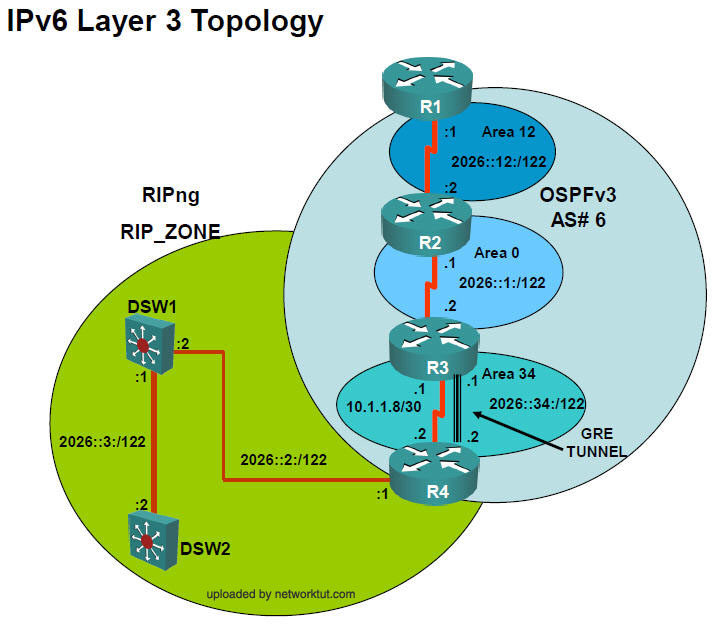
Below are the topologies of the real TSHOOT exam, you are allowed to study these topologies before taking the exam. It surely saves you some invaluable time when sitting in the exam room (Thanks rrg for sharing this).
IPv4 Layer 3 Topology

IPv6 Layer 3 Topology
Layer 2-3 Topology
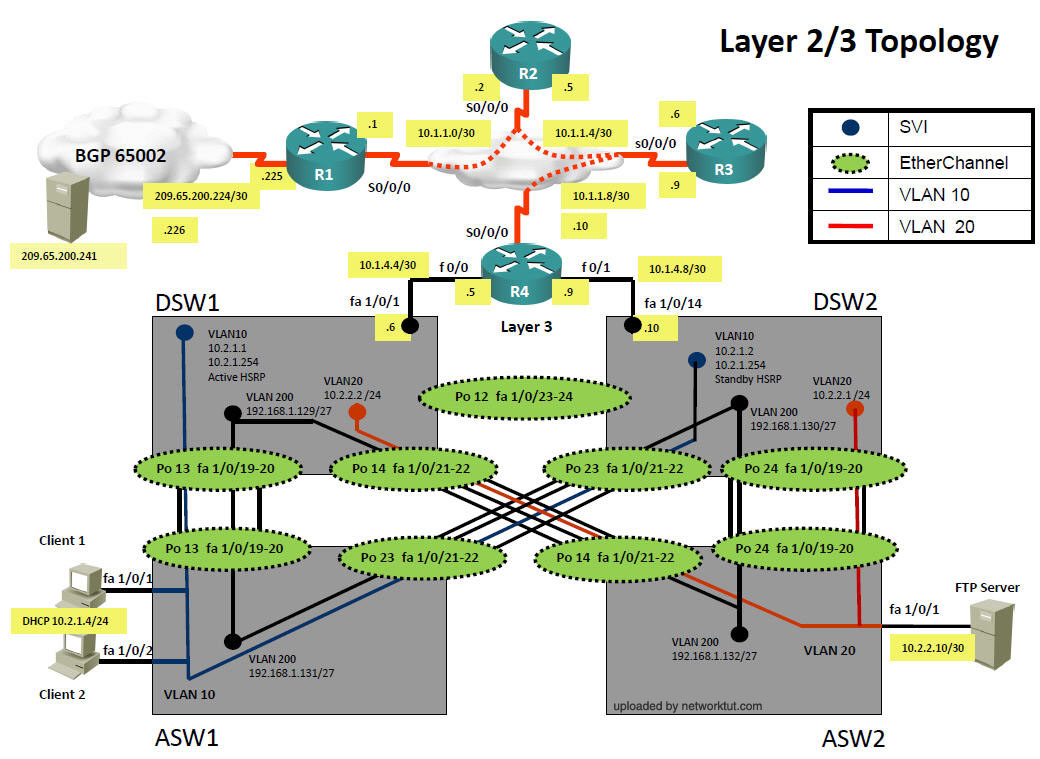
Luckily we have a link to download this lab (open it with Packet Tracer v.5.3+) (Thanks Ali and many people for sharing this)
http://www.networktut.com/download/TSHOOT_LAB.zip
Below is the screenshot of this file

A newer version of the TSHOOT exam has been added on Nov-20-2011 (Thanks zero point zero for sharing this)
http://www.networktut.com/download/TSHOOT_Exam.zip
If you have any new information about this exam, please share with us!
Below is the strategy that has been used by many candidates to pass TSHOOT. Thanks to ENA for posting this.
|
I just come from MY exam and i passed T-shoot 1000/1000
i want share some experience there i had Only one BUG IN exam For question access map
U need to choice Aswn1 to get correct Answer
because if u make Dwsn1 U will see not there Option to get correct answer..
Well
all those TT are the same all
The TT’s that I got are mentioned below:
1. ASW1 – Allowed Vlan
2. ASW1 – Port Security
3. ASW1 – Access Vlan
4. DSW1 – Access Map
5. DSW1 – HSRP
6. R4 – IP DHCP – first delete ip dhcp excluded-address 10.2.1.1 10.2.1.253 and then enter ip dhcp excluded-address 10.2.1.1 – 10.2.1.2
9. R2 – IPv6
10. R1 – NAT ACL
11. R1 – L3 Security – ACL
12. R1 – BGP – Wrong BGP Neighbor Address
13. R1 – OSPF Authentication
I didn’t get there any IP Helper there also i checked all TT and IP helper was not configured there..
Well now I want to Describe how to find more easy the TT
first with 3 TT which be ON R1..
IN 3 TT U can Ping 10.1.1.1 which tickets are Nat , BGP , Access list , remember IN 3 TT U can ping 10.1.1.1 which is R1
totally are 4 TT on R1 which IN one Ticket u cannot ping 10.1.1.1 but u can ping 10.1.1.2
which Ticket is Ospf authentication….
Dont lose ur time use abort abort abort and abort First I found those 3 TT where I can ping 10.1.1.1 and one ticket when u cannot ping 10.1.1.1 but u can ping 10.1.1.2 which is
ospf authenteticaton…
4 TT Gone of R4
now Find 2 TT HSRP and IPV6 which are so clearly as question….. Now totally 6 TT GOneeeee
Next steeep
FIND 4 TT which Client 1 Get IP address 169.x.x
which are Access vlan 10 , port security issused on f0/1/0 , Trunking Interface Those 3 TT u Must must must Check ON ASW1 Remember…
One TT is ON R4 Layer 3 Topology which Client get IP 169.x.x.x
which Is DHCP ON R4 router R4 – IP DHCP – first delete ip dhcp excluded-address 10.2.1.1 10.2.1.253 and then enter ip dhcp excluded-address 10.2.1.1 – 10.2.1.2
Now 10 TT Goneeeeeeeeeee
now Find TT which Client get IP address 10.x.x.x but cannot ping the Gateway
Using abort
that Is Access Map but in this TT is one BUG and U need to choice ASW1 to get Correct answer because doesn’t see any option Vlan acl / Port ACL *
IF u select AWS1 U will see this One Vlan Acl POrt
now 11 TT GONeeee
now 2 TT Of R4 which Client get IP address 10..x.x.x
Route Redistribute , and Passive Interfaceee ,,
I played with those 2 TT for more 20 MIN just to play and to spend the time because i did exaaamm so fast 30 MIN
and i stayed for 1 Hour
well now are ONLY 2 TT
When select One TT of them
IN one U will see wrong redistribute I mean name of spelling of Route map…
if U use abort and JUMP another TT U will see then Correctly Route map spelling name and u will see another one new with Passive Interface Under EIGRP
Well the First I end this one with wrong spelling route map..
and for this one the last with passive interface i did in the end
and u must select
R4
EIGRP
no passive interface under eigrp process in Interface f0/1 and f0/0
now 13 TT GOneeeee 100%
Well also i want tell YOU something is better to Useeee 46Q there are all all all all all the answers the same when U select just there in that DUMP
are 2 questions WRONG
Interface Trunking allow vlan 10 , correct answer is 10.200
now as that dump 10.20.200 keep this In Mind..
and another one Port security In this dump 46Q are Wrong
for this one port security need to choice with shutdown and no shutdown there on dump write somthing different right
I hope this have been Information for all OF you
Here is the strategy which I Useddddddd
Problem Device Problem Description
A – > ASW1 –> Access VLAN 10 ( Layer 2 )host 1- 169.x.x.x
P – > ASW1 –> Port-Channel not allowing VLAN 10 ( layer 2 )host 1- 169.x.x.x
S – > ASW1 –> Port Security needs to be disabled ( layer 2 )host 1- 169.x.x.x
H – > DSW1 –> HSRP Track 10 ( layer 3 ) host 10.x.x.x
V – > DSW1 –> VLAN Filter ( layer 2 ) host 1 -10.x.x.x
E – > R4 –> DHCP wrong exclude address host 1- 169.x.x.x
P – > R4 -> Passive Interface Under eigrp 10 host 1 – 10.x.x.x
R – > R4 –> Route Redistribution ( layer 3 )host 1- 10.x.x.x
6 – > R2 –> IPv6 OSPF ( Ipv6 topology ) ipv6 ip add
B – > R1 –> BGP wrong Neighbor IP ( layer 3 )host 1 – 10.x.x.x
N – > R1 –> NAT ACL miss configured ( layer 3 ) host 1- 10.x.x.x
A – > R1 –> ACL blocking traffic on int ( layer 3 )host 1- 10.x.x.x
O – > R1 –> OSPF Authentication issue ( layer 3 ) host 1 – 10.x.x.x
Try the following strategy.. if you have got time… This i have found from one of the post…. your strategy is good, but how will you find out which ticket is having that particular issues… this may help you…
If you can ping 10.1.1.1 Then faulty device is definitely R1. Check this website. This is 100% correct. From client ping 10.1.1.1. If successful then R1 is the faulty device. It is simple concept. Any device before that does not have faulty configuration. Because you can reach R1 it means DSW1, R4, R3, R2 is allowing you to reach R1. If any of them had wrong configuration then you would not be able to ping 10.1.1.1. From client I pinged 10.1.1.1 more frequently then others. Once you can ping 10.1.1.1 then you definitely know the fault is with R1. No doubt about about that.
1. Can be faulty BGP neighbour. Wrong ip address of neighbour. Use show run. You know where to look. Under router bgp 65001.–> sh ip bgp sum
2. Check NAT access list. Look for permit statement. If permit 10.2.0.0 0.0.255.255 is not present then it is NAT Access list.
3. Check edge_security access list. If the permit statement is missing for — permit 209.65.200.224 0.0.0.3 then it is IPV4 layer 3 security.
So, you can see that if you can ping 10.1.1.1 but can not ping 209.65.200.241 then 3 TT for R1.
Now if you can ping to 10.1.1.2 but can not ping 10.1.1.1 then it is definitely R1. ip ospf authentication message-digest on serial0/0/0/0.12 interface. Check configuration on R1. You will see that — ip ospf authentication message-digest is missing. So it R1, OSPF, ip ospf authentication message digest.
In total R1 has 4 TT.
3 TT — You can ping R1 but can not ping 209.65.200.241
1 TT – You can ping 10.1.1.2 but can not ping 10.1.1.1.
As soon as I opened a TT –> I used ipconfig to see the ip address. If it is 169.XXX then 3 TT for ASW1. If it has valid ip address such as 10.2.1.3 then i immediately pined 10.1.1.1 to see if the fault is with R1. 3 TT gone.
Total 6 TT gone in the blink of an eye.
ASW1 – 3 TT – if ip address is 169.xxxx
(1.switch port security: Symptoms for this ticket:-
1- Client 1 is getting 169.x.x.x ip address
2- Client 1 is unable to ping Client 2 as well as DSW1.
3- ‘sh interfaces fa1/0/1′ will show following message in the first line
‘enFastEthernet1/0/1 is down, line protocol is down (err-disabled)’
4- ‘sh running-config’, you will see ‘switchport port-security mac-address ’0000.0000.0001′ configured under fa1/0/1.
if u did not have the port in err-disable mode but in the config there was a port security mac 0.0.0.0….. command assigned
so if u do show int fa 1/0/1 it will show it as UP so do not get confused)
(2.vlan1–> vlan10)
(3.trunk allowed: int range portchannel13,portchannel23
switchport trunk allowed vlan none
switchport trunl allowed vlan 10,200)
R1 – 3TT – if you can ping R1 10.1.1.1
R1 – 1TT if you can ping 10.1.1.2 but can not ping 10.1.1.1
If HSRP mentioned then you know it is DSW1
If ipv6 or ospfV3 mentioned then you know it is R2.
9 TT very simple.
Now if you can not ping 10.1.1.1 or 10.1.1.2 then you come back near client. Like DSW1, R4.
DSW1 – 1 more TT — Vlan ACL – Look for VLAN Access Map
R4 – 3 TT: EIGRP Passive interface , DHCP on R4 which get IP add 169.x.x , OSPF-to-EIGRP (OSPF->EIGRP).
also now we have 2 TT new to idendify them if client now get ip add 169.x.x also check ON R4 for DHCP
this new One again ON R4 for passive Interface
now totally we have 3 TT ON R4
4 TT on R1
Dws1 2 TT
R2 1 TT
Asw1 3 TT
|
* Note: The bug has been fixed recently so you can select DSW1 device, next page you have to scroll down and you will find the VLAN Access List/PACL option.
Best wishes to those who are going to take this exam!

thanks
excellent job.
Snap shots of software in CD of TSHOOT Official_Certification_Guide
http://www.4shared.com/file/229431389/fa60196e/642-832_TSHOOT_Practice_Questi.html
A Very Useful TSHOOT LAB (LAB with complete text configuration files) which make me hell scared and I start my preparation for ISCW and ONT to become NP before TSHOOT Compulsory to become NP :D
http://turboshare.com/files/56591/IEWB-RS-VOL4.rar.html
Other Links as well
http://www.4shared.com/file/229379500/62d9e9e7/TSHOOT_Exam_Topology.html
source:
https://learningnetwork.cisco.com/thread/10965
Good Luck for those who are attempting TSHOOT..:D
CCNP will now be three exams, ROUTE, SWITCH, and TSHOOT
Exam price will increase from $150.00 to $200.00 per exam
ROUTE and TSHOOT courses (typically 1 week Cisco official courses) are now supplemented with e-learning material (nearly 8 hours for ROUTE and 9 hours for TSHOOT) which is exam material
Classes / Exams are becoming even MORE real-world (TSHOOT class is 92% hands-on)
New ROUTE and SWITCH exam is available in March, TSHOOT is available in April.
BSCI exam can substitute for ROUTE or vice versa
BCMSN exam can substitute for SWITCH or vice versa
ONT and ISCW exams can substitute for TSHOOT until end of July (ONT/ICSW exams expire then…BSCI and BCMSN are no longer offered after July 31, however can substitute for ROUTE / SWITCH for their entire 3 year expiration period).
New CCNP exams now prepare you more for the CCIE R&S
recently one guy took this exam and according to him……he gave the following info from his exam.
*****
- BGP relationship not established due to an ACL on the outside interface of the enterprise’s router.
- BGP relationship not established due to a misconfiguration of the neighbor’s IP.
- Traffic from clients’ VLAN denied by a VLAN ACL on the distribution switch.
- EIGRP not working due to a route-map misconfiguration (the name was wrong, f.i. EIGRP_OSPF instead of EIGRP-OSPF).
- OSPFv3 not passing the routes from area 12 to area 0 because area 0 router hasn’t any interface in area 12.
- Clients can’t reach Internet due to an access-list misconfiguration for the NAT source-list addresses (their IPs doesn’t appear in the ACL).
- Clients can’t obtain IP by DHCP because their access ports aren’t configured in the VLAN 10 on access switch SW1 (both are in the default VLAN1).
By the way, commands as show arp, arp -a, show access-list, show ip bgp did not work in the exam.
Took the Tshoot this week. Wish I had paid more attention to the advice on here. I wasted too much time on the first 3 troubletickets and only had about an hour left to complete the next 9. My test consisted of only 4 pretty easy multiple choice questions and 12 troubletickets. My advice is definately listen to ngnetwork – if it is taking too long go on, and come back to that one. On top of that make sure you are very familiar with the topology, especially the layer 2/3 topology with the 2 access layer switches, 2 backbone switches, and the etherchannels. I must have had 4-5 troubletickets whose problem was in that general area. Good luck to all who are taking it – I plan to re-test soon now that I fully understand where my skills are weak.
So.. Failed ;(
Were 3 multy choice questions and 12 TT.
Most TT from ngnetwork’s 05-03-2010 post.
Time was sufficient. About 6 min left before end.
My little advice – don’t forget look at Client’s ipconfig.
This exam is really interesting!
@bd
thanks for your response.
can you tell us some tickets which were in the exam and you found it difficult …..
@ngnetwork
Were 1 or 2 TTs where traceroute to 209.65.200.224 from both ASW1 and ASW2 stops on 192.168.1.129 (DSW1 – look in L2/L3 topology). And i am not found any problems on DSW1 and R4…
I think most difficult TT were with etherchannel problems.
Simplest TT were with R1 problems – wrong ACL, wrong BGP neighbour IP, BGP redistribution in OSPF…
Were one interesting TT. With VLAN route-map. We have ACL that permit Client’s IP. And route-map rule drop if much this ACL. And were 2 decisions 1) delete this route-map 2) delete ACL. I think, both correct. But, right answer only one…
@bd
thanks again. i think that u need to delete the ACL for the VLAN route-map TT. i have few questions.
So, in the exam you had the same IP addresses as defined here in the topology ?
does traceroute work in every TT ?
do u remember any IPv6 TT ?
@ngnetwork
>So, in the exam you had the same IP addresses as defined here in the topology ?
Yes, same as here.
>does traceroute work in every TT ?
Tracert command not work on Client :( So I do traceroute from ASW1 at first to determine where ping fails, because ASW1 closest to Client.
On other devices traceroute work properly.
>do u remember any IPv6 TT ?
Was only one IPv6 TT, from you post.
- OSPFv3 not passing the routes from area 12 to area 0 because area 0 router hasn’t any interface in area 12.
So sad, that debug’s commands not implemented :(…
@bd
ya the debug command is very useful in real life troubleshooting.
i think to pass this exam you have to make 10 TT correct…..
did u find any DHCP / NAT / STP issue in TT ?
@ngnetwork
>i think to pass this exam you have to make 10 TT correct
Yep, I think so. I don’t answered correctly on multy choise questions. And only about 6-7 TT correct..
>did u find any DHCP / NAT / STP issue in TT ?
Hmmm… STP definitely not, NAT not shure, but may be not, too. DHCP may be, but I am only later recalled about ipconfig command on the Client.. So may be those TT, where I don’t find answer, where with DHCP issue..
@bd
did u find any ticket with frame-relay ?
@ngnetwork
Hmm I guess no.. But, in 2-3 TTs I have no idea what couse the problem. I forgot to check DHCP pool, and may be frame-relay map too..As I remember, traceroute usualy stoped on DSW1 or R1. So.. I don’t think that frame-relay could be couse of connectivity problem
what were the etherchannel problems? how about port channel?
@rindel
PAgP’s or LACP’s incorrect ports configuration. I don’t remember more exactly.
so i passed with 972/1000. 3 MCQ i answered one right. and 12 TT i answered all right.
I’ll post my opinion.
1- the topology has the configurations for both ipv4 and ipv6. so when tackling an issue, you should be aware if the question is ipv4 or ipv6 related. and you should be able to know which commands are for ipv4 and which are for ipv6. (it was very confusing for me when i saw the run config)
2-if you know where and what techology is the issue, but can’t figure out which line should be fixed. abort the ticket, check the configuration from another ticket it might help.
3-if you cant figure out the issue, abort the ticket, come back to it at the end. you might end up wasting too much time on it.
4-if you have the exam topology (you can get it from cisco website). then they follow the exact same toplogy with ip addressing, keep in mind they didnt show the loopback addresses.
How i solved.
1-first, do ipconfig at the client, to know that client getting ip address. if not, troubleshoot.
2-ping default gateway, if cant. trouble shoot.
3-traceroute from default gateway to destination in the question (usually the server 209.65.200.241). troubleshoot from the point the traceroute fails.
which one is the default gateway ??
I guess its R4, is it right ?
No, from the topolgy, it is DSW1 (since it is the active HSRP for vlan 10.)
for further details please visit http://certcollection.org/forum/index.php?/topic/21292-hi-everyone-i-passed-643-832-tshoot-today/page__st__140
@night_wolf_in
did u get any ticket with etherchannel ?
Were there any spanning tree questions or tt’s?
@ngnetwork:
No etherchannel questions. although i had to check them. etherchannels configuired as trunks (one channel between DSW1 and DSW2 is routed port). so i wanted to make sure that vlans are passing and not pruned.
@rindel:
nope, nothing with spanning tree.
@night_wolf_in
thanks for your answer.
did u get any ticket related to frame-relay technology ?
@Night_wolf_in
Hello Dear How much time you pass for T-Shoot Preparation?
OK, I put down my 200 buck and took this test just to see if I could pass it. Not a chance! One thing I found real confusing was that alot of the configs have numerous problems at the same time. As everyone has stated the debug commands do not work, along with some of the show commands. See break out below:
3 MCQ/12 TT’s
- BGP misconfig
- OSPFv3 not running
- HSRP ???
- Port Security x 2
- DHCP x 2
- ACL
- EIGRP AS
- Route Mapping
Failed by a little, but hurt alot! Finished with 45 min on the clock…
Hey guys.
I just took the exam and passed, thanks for the help through all the CCNP certification process, i have just become a NP.
I had three questions and 12 TT, the questions were.
1.-What type of trap is a “serial line up” message
2.- they showed you an ip ftp user and password configuration and then ask you which of the options could be used as a correct alternative (i select something about TFTP, no idea though)
3.-Dont remember
TT
-BGP not being able to established a connection due to an ACL, the solution isn’t taking in out, but correct the configuration, check the ip addresses.
- OSPFv3 area type misconfiguration
-wrong vlan access on access switch
-vlans not allowed by STP
-Vlan access map droping traffic
-Redistributing with the wrong route-map
-IPv6 ripng not configured on physical interfaces
-NAT ACL misconfiguration
-port security filtering access ports to get DHCP address.
-Wrong neighbor IP on BGP
-tracking interface misconfigured on HSRP, they dont track the interface directly, but use the GLBP way.
I forgot one it seems, be careful with this test, there are more than 1 problem per ticket, just that only one problem affects directly what you are troubleshooting, for example, on switching related TT, L3 devices didn’t have a last resort to the 209.x.x.x, so even if you fixed the switching problem, there is no way for that ping to respond, but….everything is correcly configured, is like they forced this weirds things to happen to confuse you or make you waste time checking the configuration, you need to trust on the sh run and in your knowledge of how things should work.
Be advised, traceroute doesn’t work from the clients, this sucked a lot, use a L3SW instead using the vlan as the source, not all the commands are available, no pipes either.
I studied the official cisco press for this exam and a lot of practice on GNS3, now going to CCIP. Make sure you excel at all topics, even knowing the answers, the goal of all of us here is to truly be a godlike being on networks, not just “pass” the exam.
Good luck to everyone, and sorry for the english, it’s not my native language.
@Ju:
can you give more details about the ticket with more than one thing broken? For example what was your task? I’ve read that most (if not all) of the tasks are to make Client1 ping Web server 209.65.200.241. So to do it you’d have to solve all L2 and L3 problems that are on the way to the web server i’d guess…
and one more thing:
“vlans not allowed by STP” – you mean by STP or by trunk?
“port security filtering access ports to get DHCP address.” – what do you mean by that? Ports shut down by port security due to violation?
@charles
-Most of the TT were ping the 209.x.x.x, but some not, for example, there was a question about HSRP not being active for the vlan 10, the ping was working through DSW2
-Vlans not allowed in the trunk, question is about client 1, but client 2 has the same problem.
-port security with static MAC, the client was getting the 169.x.x.x, now, this was a leap of faith, since you really cant see the MAC of the client to make sure it’s misconfigured, but, as i state before, everything else related to how that host should get its ip address was correct, so i assume it was the port security thing.
I just remember the third question, it was about some port security interfaces in the errdisable state and how to make those operational again.
There were more than one TT with last resort issues, but properly configured.
Interesting. Maybe apart from Cisco confusing us some of these things were just a matter of separating a symptoms from the real cause of the problem? For example there might be some configuration error on the routers R3 or R4 or switch DSW1 which might cause gateway of last resort of not showing. But yeah when you have layer 2 problem it’s completly different thing.
Thanks for info you’re providing Ju, it’s priceless.
Might I ask you what was the answer for:
“What type of trap is a “serial line up” message”?
Is it about logging severity level (LINEPROTO-5-UPDOWN so that would be 5) or about which layers are operational (that would be 1 and 2)?
If they ask about severity levels of certain logs then we’re doomed!
“they showed you an ip ftp user and password configuration and then ask you which of the options could be used as a correct alternative (i select something about TFTP, no idea though)”
I’m not sure if I get it.. options for alternative to what?
Cheers and congratulations on your exam!
Actually, i didn’t get that question about FTP either XD!!! they showed you this:
ip ftp user cisco
ip ftp password cisco
And then ask you for an alternative to this command, there were some ip tftp, ip scp and other two…no idea about the answer but i can tell you this, ip tftp isn’t
The question about the interface state were about logging severity levels, they showed you a down and up, an then ask you just about the last state and to what type of severity belongs.
About the multiple problems, well, i review the configurations of the “others” devices, and everything was alright, i remember for example, R1 was not advertising a default route, but everything was correctly configured, i even abort one ticket to check another (i thought i was becoming crazy or something) and realized that the configuration was the same.
Mi advise is, start from the client, the closest problem IS the problem…it work for me at least.
Passed with 917 points by the way, the first three question are just too weird , i answer just one right,
On some TT’s there were at least two correct answers so you really need to stick with the optimal way, and not just the easier, even if will fix the problem.
“The question about the interface state were about logging severity levels, they showed you a down and up, an then ask you just about the last state and to what type of severity belongs.”
Did they write the whole message? Like:
“%LINEPROTO-5-UPDOWN: Line protocol on Interface FastEthernet0/14, changed state to up”
If yes – that’s easy, because you can tell it by “-5-” number there (as far as I know).
“And then ask you for an alternative to this command, there were some ip tftp, ip scp and other two…no idea about the answer but i can tell you this, ip tftp isn’t”
Maybe it was about command out-of-configuration mode where you type username and password in the address of FTP server?
ftp://username:password@10.1.1.1
“Mi advise is, start from the client, the closest problem IS the problem…it work for me at least.”
Aye.. follow the path method is what I’m planning to do as well.
917 is great score yay!
1- The showed the whole line, i remember one of the options, it was, “if you type logging trap warning, will save the up message?”, the other options were of the same kind.
2.-Al the options were configurations of user and pass for different stuff, i don’t think is related, but then again, i really didn’t understand that question.
Yeah, is the fastest way, i always checked the ipconfig, ping the GW and from there trace using the vlan as the source on the L3SW, this is critical to troubleshoot this exam.
Just passed TSHOOT exam.
The Passguide dump is not valid at all.
Had 3 Multichoice, 12 tickets, nothing new to add then what has already been said here.
@ asdf – The txts are in careercert.info has them in the lab companion (LG). This is not acutal lab, only practice stuff.
@ Maledjo – You need to specify which device the problem is, what protocol or part of the config has the issue and how to solve the issue. Everything is multichoice just like the cisco demo.
I recommend: read the cisco press (not the best book but multichoice questions need this) setup a lab using actual topology as specified above.
If you used braindumps for BCMSN and BSCI you will never pass this exam.
GL everyone
@TSHOOT in June
can u give us a brief hints of the tickets you got
@ngnetwork
Same issues as Ju had (same topics)
Multichoice was about FCAPS + Logglevels + cant remeber third. but it was not FTP that Ju had.
Nothing new really, all i can say that the dump was not valid.
Ticket
1) Client 1 is not able to ping the server
Sitution 1: Unable to ping DSW1(Use L2 Diagram)
Vlan Access map is applied on DSW1 blocking the ip address of client 10.2.1.3
Ans1) DSW1
Ans2) Scroll down and click on vlan access map
Ans3)No vlan filter 10
2) Client 1 is not able to ping the server
Situation2: Unable to ping DSW1(Use L2 Diagram)
On ASW1 fa1/0/1 and fa1/0/2 switchport access vlan 10 command is not there
Ans1)ASW1
Ans2)Access vlan
Ans3)give command: interface range fa1/0/1-/2 switchport access vlan 10
3) Client 1 is not able to ping the server
Situation3: Unable to ping DSW1 & in port channel configuratioin of ASW1 vlan 10 is not allowed. (Use L2 Diagram)
Ans1)ASW1
Ans2)Switch to switch connectivity
Ans3)on port channel 23 give switchport trunk allowed vlan 10,200
4) Client 1 is not able to ping the server
Situation4: Unable to ping DSW1(User layer 2),under running config the mac address for fa0/1 is 0000.0000.0000.0001 and fa0/2 it 0002.Also check show interfaces fa1/0/1 and fa1/0/2, u will c that the interface is in error disabled
Ans1)ASW1
Ans2)Port security
Ans3) On fa1/0/1 and fa1/0/2 do disable port security and do shut ,no shut.
5) Client 1 is not able to ping the server
Situation 5: Unable to ping R4 fast ethernet port from dsw1 and check ip eigrp neighbors from DSW1 u willnot c R4 as neighbor.(use ipv4 Layer 3)
Ans1) R4
Ans2) IP4 EIGRP
Ans3) Change eigrp process no: from 1 tp 10 because DSW1
6) Client 1 is not able to ping the server
Situation 6: Unable to ping serial interface of R4 from the clients. Do show run, check the names of the route-maps. (use ipv4 Layer 3)
Ans1) R4
Ans2) route redistribution
Ans3) change the name of the route-map under the router EIGRP or router OSPF process from ‘to’ to ‘->’.
7) Client 1 is not able to ping the server
Situation 7: client is unable to ping R1’s serial interface from the client. Check where authentication is not given under router ospf of one of the routers ( R1 or R2). (use ipv4 Layer 3)
Ans1) R2 or R1
Ans2) ipv4 OSPF
Ans3) ip ospf authentication command must be given under router OSPF
8) Client 1 is not able to ping the server
Situation 8: client is not able to ping the web server, but the routers can ping the server. NAT problem. (use ipv4 Layer 3)
Ans1) R1
Ans2) IPV4 NAT
Ans3) under NAT access list, enter the command permit 10.2.0.0 0.0.255.255
9) Client 1 is not able to ping the server
Situation 9: R1 is not able to ping 209.65.200.226. check bgp neighborship. The neighbor’s address in the neighbor command is wrong under router BGP. (use ipv4 Layer 3)
Ans1) R1
Ans2) BGP
Ans3) delete the wrong neighbor statement and enter the correct neighbor address in the neighbor command (change 209.56.200.226 to 209.65.200.226)
10) Client 1 is not able to ping the server
Situation 10: client is not able to ping the server. Except for R1, no one else can ping the server. BGP routes have not been redistributed into OSPF. (use ipv4 Layer 3)
Ans1) R1
Ans2) route redistribution
Ans3) under router OSPF, enter the redistribute BGP 65001 command.
11) IPV6 loopback of R2 cannot be pinged from DSW1’s loopback.
Situation 11: ipv6 ospf was not enabled on R2’s serial interface connecting to R3. (use ipv6 Layer 3)
Ans1) R2
Ans2) IPV6 ospf
Ans3) on the serial interface of R2, enter the command, ipv6 ospf 6 area 12 (or area 0, check the IPV6 topology.)
12) HSRP: DSW1 does not become active.
Situation 12: under the standby configuration of DSW1, the command standby 10 track 1 decrement 60 is given, this has to be changed to track 10. (use ipv4 Layer 3)
Ans1) DSW1
Ans2) HSRP
Ans3) delete the command with track 1 and enter the command with track 10.
Multiple choice:
1)FCAPS:
FFault
CConfig
AAccounting
2)Drag and Drop(Get the answer from text)
FACPS———————fault,config acco,perf sec
ITIL————————-frame work for it prof
Cisco Services———–
TMN———————-tlecom managemnr
3)Drag and Drop
CLI——EEM
GUI—–SDM
Backup-FTP
4)Question is unkown
Ans) NTP prefferd
5) Logging console warning
The standard order is
Emergency
Alerts
Critical
Errors
Warning
Notification
Informational
Debugging
The answer can be :
Logging buffered.
6) Network Maintenance
Ans) Structured and interrupt driven
7) The interface is up and protocol is up. When do u get these messages.
Ans)
8)Serial line is up,protocol is also up?But cdp neighbor not working?
Ans) Data link layer.
9) FTP username password
Ans ) HTTP client username password
ASW1
1. Accessports not in VLAN 10
2. PortChannel not allowing VLAN 10
3. Port Security
DSW1
1. HSRP – Track 10
2. VLAN Filter
R4
1. EIGRP – Wrong AS #
2. Redistribution (->)
R2
1. IPv6 : Enable OSPF
2. OSPF Authentication
R1
1. Wrong IP of BGP Neighbor
2. NAT : ACL
3. Redistribution Accesslist
Just passed with a 1000. Wow, big monkey is off my back. This site was very helpfull. Here is some helpfull info for attacking this exam:
Always start off from PC and ping every interface along the way until you narrowed down where the prolem is. Tracert did not work. Once you get to the single router then examine the configuration. ngnetwork 05-03-2010 posting was on the money. So was dubya
(((12) HSRP: DSW1 does not become active.
Situation 12: under the standby configuration of DSW1, the command standby 10 track 1 decrement 60 is given, this has to be changed to track 10. (use ipv4 Layer 3)
Ans1) DSW1
Ans2) HSRP
Ans3) delete the command with track 1 and enter the command with track 10.)))
ok guys..did any one notice this question???
i mean this part (the command standby 10 track 1 decrement 60 is given)..so if this command issued under DSW1..it will mean that if interface 1 goes down the switch have to decrement 60 from the priority…and that will make DSW1 priority lower than the other switch..so the other switch will be the active HSRP…right????…but the question ask why DSW1 does not become active ,,and the answer says that the problem is in DSW1 and we should change the track interface from 1 to 10…..i mean that the tracking of an interface is to make sure that if the interface goes down,the other switch will be the active HSRP….i hope u can understand my point view..sorry if i confuse u guys..please have a look
waaaaw I was away for a week and look at the place, Congs to theses who have passed the exam and GO GO GO to these who are taking it on.
@mm what if both switches are on defualt Prio. of 100 then u will needa tracking interface of 10, that means 100-10 = 90 so DSW1will have > prio. and there fore become the ACTIVE HSRP, for DSW2 to retake the ACTIVE role will need Preemp.configured.
I hope that helps
just pass 972(12 TT-100%,1 Drag&drob,2 mcq -33%)
about Situation 12: under the standby configuration of DSW1, the command standby 10 track 1 decrement 60 is given, this has to be changed to track 10. (use ipv4 Layer 3)
in global mode created track 1,10(in command “track 10″ it is not interface)
example(ip not real,threshold from exam):
track 1 ip route 10.1.1.1 255.255.255.0 metric threshold
threshold metric up 1 down 2
!
track 10 ip route 11.11.11.11 255.255.255.0 metric threshold
threshold metric up 61 down 62
Situation 6: Unable to ping serial interface of R4 from the clients. Do show run, check the names of the route-maps. (use ipv4 Layer 3)
in router eigrp:
redistribute ospf 1 route-map EIGRP_to_OSPF
BUT route-map was named:
route-map EIGRP->OSPF
failed by a little…will retake it soon i hope…
the exam was really confusing
some of the question that i remember from the test:
-what will happen is u configure to router to be NTP servers??
have know idea what is the answer
-port security is enabled in the interfaces connecting to the clints (with wrong mac add)
-eigrp AS is wrong in R4
-problem with ether-channel..that no allowing vlan 10..(maybe port channel 23)
- DSW1 does not become active (HSRP)
-there was another case where the clint could not get an ip address
-ipv6 ..loopback address of R2 cant ping loopback address of DSW1
that what i can remember for now..i will update if something come to my mind
D&D :
FCAPS–model defined by the International Organization for Standardization
(ISO).
ITIL– dont remember (something about practice for frame relay )
TNM–network management
model is the Telecommunications Standardization Sector’s (ITU-T)
Cisco lifecycle–model is often referred to as the PPDIOO model
MSQ:in severity level Warning that message can u see
answers was about
1 – notificationn information debuging
2 – emergency alerts critical
3 – information debuging
4 – debuging notification alert
TT was:
1.cant ping server.Problem was disable autentification on R1
conf R1 was:
interface Serial0/0.12 point-to-point
ip address 10.1.1.1 255.255.255.252
ip nat inside
ip ospf message-digest-key 1 md5 TSHOOT
router ospf 1
log-adjacency-changes
network 10.1.1.0 0.0.0.3 area 12
default-information originate always
conf R2 was:
interface Serial0/0.12 point-to-point
ip address 10.1.1.2 255.255.255.252
ip ospf authentication message-digest
ip ospf message-digest-key 1 md5 TSHOOT
answer: on R1 need comand in router mode
area 12 authentication message-digest
TT2:
HSRP: DSW1 does not become active.
conf on dw1:
track 1 ip route 10.28.123.123 255.255.0.0 metric threshold
threshold metric up 1 down 2
!
track 10 ip route 11.11.11.11 255.255.255.0 metric threshold
threshold metric up 63 down 64
interface Vlan10
ip address 10.2.1.1 255.255.255.0
standby 10 ip 10.2.1.254
standby 10 priority 200
standby 10 preempt
standby 10 track 1 decrement 60
answer: on dsw 1 interface vlan 10 mode run:
no standby 10 track 1 decrement 60
standby 10 track 10 decrement 60
(ip for track command not exact for real exam)
TT3:
cant ping server.Problem: bad on R1 bad BGP neighbor ip
conf on R1:
router bgp 65001
no synchronization
bgp log-neighbor-changes
network 209.65.200.224 mask 255.255.255.252
neighbor 209.56.200.226 remote-as 65002
no auto-summary
answ: need change on router mode on R1 neighbor 209.65.200.226
TT4: cant ping server
problem on R1 Nat acl
answ:add to acl 1 permit ip 10.2.1.0 0.0.0.255
TT5: cant ping server
Problem:on R1 acl blocking ip
acl something like this:
deny 10.2.1.0
deny 10.1.4.0
deny 10.1.1.0
permit 209.65.200.241
TT6:cant ping server
on dsw1&dsw2 Vlan filter blocking traffic
answ:delete vlan filter
TT7:cant ping server
on asw1 portsecurity mac 0000.0000.0001, interface in err-disable state
answ:on asw1 del portsecurity & do on interfaces shutdown, no shutdown
TT8:cant ping server
on ASW1 on interfaces 0/1,0/2 switchport access vlan 1
answ:on ASW1 change
switchport access vlan 1 to switchport access vlan 10
TT9:cant ping server
on R4 in router eigrp:
redistribute ospf 1 route-map EIGRP_to_OSPF
BUT route-map was named:
route-map EIGRP->OSPF
answ:change in router eigrp router-map name
TT10 cant ping server
on R4 router eigrp 1
but on dsw1&dsw2
router eigrp 10
answ: change router AS on R4 from 1 to 10
TT11:dont remember exactcant.cant ping ipv6 address from R1 to R4
on R2 on interface not working routing ospf
answ:interface configuration mode:
ipv6 ospf 6 area 12
TT12: dont remember
>>Why you choosed po23?
no answer about po 13, only 23
>>Hi weird, I didnt get the TT2 answer, how track 10 will solve the problem??
All is simple — in another questions configured track 10 :)
i dont remember real ip but i think in this the matter or in threshold
in track 1 it 1 to 2
in 10 it around 60
Hi All,
Just passed the exam. Thanx for all the comments and feedbacks.
just one feedback:
I had one MC question about the command: logging console warning.
All the answer were false but i had to chose between the closest to the right answer.
We all know that this command will activate console logging for warning, error, critical, alert and emergency. But the choices was:
1- i forgot
2- warning, notification, error, debugging…
3- just warning logging
4- warning, critical, alert, emergencies
I chosed the 4th ans (in which “error” is missing) and that was the right ans.
Nothing to add, just learn hard and follow the advices above.
Tnx to all of u.
BR
fail again :(
dont know way???
i had 3 MCQ
and 12 labs
1)eigrp AS in R4 is configured wrong..its says AS 1, it should be AS 10…
2) ipv6 : loopback addres of R1 cant ping loopback address of dsw1…the problem is in R2, R2 cant establish neighborship relation with R1 because it dose not have any interfaces in area 12..the solution is to go under the interface that connect R2 with R1 and type ipv6 ospf 1 area 12
3) DSW1 dose not became active (hsrp) :
in DSW1
track 1 ip route X.X.X.X 255.255.0.0 metric threshold
threshold metric up 1 down 2
!
track 10 ip route X.X.X..X 255.255.255.0 metric threshold
threshold metric up 63 down 64
interface Vlan10
standby 10 priority 200
standby 10 preempt
standby 10 track 1 decrement 60
answer: on dsw 1 interface vlan 10
delet the track 1 and use the track 10 instead
4)ASW1 have port security enabled (mac address) for the interfaces that connect to client 1 and client 2
answer : under those interfaces (no switchport security, then shutdown and no shutdown
5)ospf authentication between R1 and R2…in R2 the message-digest is enabled under the interface connecting R2 to R1….in R1 ospf authentication is not enabled under the interface…the answer is to enable ospf authentication in R1,,but there no choose to enable it under the interface..they give the choose to enable ospf under area 12..which is the right answer
6)bgp neighbor statement is wrong in R1(it have the wrong ip address : it says 209.56.200.226..it should be 209.65.200.226)
7)R4 has route map to redistribute between eigrp and ospf…but in the name of the route map under eigrp redistribution does no match the name of the route map so the answer is to delete the redistribution command under eigrp (the one with the wrong roue map name) and replace it with the right route map name
8)R1 have a NAT problem :
R1 NAT access list blocks client 1 and 2
answer : under the access list u should add
permit 10.2.0.0 0.0.255.255
9)on ASW1 on interfaces 0/1,0/2 switchport access vlan 1(interfaces that connects ASW1 to the clints)
answ:on ASW1 change
switchport access vlan 1 to switchport access vlan 10
10)etherchannel problem: not sure about this one : i think port channel 13 is not permitting vlan 10 ( just look to weird comments, i just answer the as him)
11)client 1 cant ping the server..the ping does not reach DSW1 ..im almost sure that the problem is about vlan access maps….i checked DSW1 and indeed the was a vlan access map blocking the client but the problem is that if u choose DSW1 as the device that cause the problem, then u will go to the second question(which is about what technology cause the problem) and here is the problem.. non of the choices is about vlan access maps and all other choices are not relevant to the problem..,i took my time in this TT..then i decide to have a look under ASW1…there was no access vlan maps under the running config ..but the strange thing is when i choose ASW1 as the device responsible for the problem, the second question have a choose about vlan access map ..so i choose that one..and the third question (how to solve the problem) exactly match the resolution (which is deleting the vlan access filter) so it was kind of strange…i remember i had the same problem in the first exam i took ,, i even ask about it here..but know one answers me:( anyway the answer i choos was:
1)ASW1
2)vlan access maps
3)delet the vlan map (no vlan filter list..somthing like that)
12)R1 problem :..i think it was the same problem in Weird comment ::
(Problem:on R1 acl blocking ip
acl something like this:
deny 10.2.1.0
deny 10.1.4.0
deny 10.1.1.0
permit 209.65.200.241)
not sure about the answer, even Weird to have an answer in his comment
ok..eventually i did fail…i thought i did well..but i was surprise when the result come out and it says fail…i did not know where i go wrong (by the way i have all the MCQ right)
so i hop you guys to have a look to my answers and tell me what did i do wrong!!!!!!..im planig to retake the exam next week..please help
Hi mm and all,
I am a bit concerned when hearing mm has failed the exam twice. So, I’ve just quickly compiled the answers from W, Weird and mm and see if I can spot any differences:
Let start with the trouble ticket questions, then we will go though the ones that I’ve spotted the differences.
TROUBLE TICKET QUESTIONS
1) Client 1 is not able to ping the server
Situation 1:
Unable to ping DSW1 (Use L2 Diagram)
Vlan Access map is applied on DSW1 blocking the ip address of client 10.2.1.3
Answer from W
Ans1) DSW1
Ans2) Scroll down and click on vlan access map
Ans3)No vlan filter 10
Answer from Weird
on dsw1&dsw2 Vlan filter blocking traffic
answ:delete vlan filter
Answer from mm
Client 1 cant ping the server, the ping does not reach DSW1. I was almost sure that the problem is about vlan access maps, I checked DSW1 and indeed the was a vlan access map blocking the client but the problem is that if u choose DSW1 as the device that cause the problem, then u will go to the second question (which is about what technology cause the problem) and here is the problem:
None of the choices is about vlan access maps and all other choices are not relevant to the problem, I took my time in this TT, then i decided to have a look under ASW1…there was no access vlan maps under the running-config but the strange thing is when i choose ASW1 as the device responsible for the problem, the second question have a choose about vlan access map, so i choose that one and the third question (how to solve the problem) exactly match the resolution (which is deleting the vlan access filter) so it was kind of strange.
I remember I had the same problem in the first exam i took. I even ed about it here, but know one answers me.
Anyway the answer i chose was:
1)ASW1
2)vlan access maps
3)delete the vlan map (no vlan filter list, something like that)
2) Client 1 is not able to ping the server
Situation2:
• Unable to ping DSW1(Use L2 Diagram)
• On ASW1 fa1/0/1 and fa1/0/2 switchport access vlan 10 command is not there
Answer from W
Ans1)ASW1
Ans2)Access vlan
Ans3)give command: interface range fa1/0/1-/2 switchport access vlan 10
Answer from Weird
on ASW1 on interfaces 0/1,0/2 switchport access vlan 1
answ:on ASW1 change
switchport access vlan 1 to switchport access vlan 10
Answer from mm
ASW1 on interfaces 0/1,0/2 switchport access vlan 1(interfaces that connects ASW1 to the clints)
answ:on ASW1 change
switchport access vlan 1 to switchport access vlan 10
3) Client 1 is not able to ping the server
Situation3:
• Unable to ping DSW1 & in port channel configuration of ASW1
• Vlan 10 is not allowed. (Use L2 Diagram)
Answer from W
Ans1)ASW1
Ans2)Switch to switch connectivity
Ans3)on port channel 23 give switchport trunk allowed vlan 10,200
Answer from Weird
The question was about Ether-Chanel
client can’t obtain ip address(169.x.x.x)
on asw1 trunks allow vlan 20,200
Ans: On port channel 23 gives switchport trunk allowed vlan 10,200
Answer from mm
Ether-channel problem: not sure about this one : i think port channel 13 is not permitting vlan 10 ( just look to weird comments, i just answer the as him)
4) Client 1 is not able to ping the server
Situation4:
• Unable to ping DSW1(User layer 2)
• Under running config the mac address for fa0/1 is 0000.0000.0000.0001 and fa0/2 it 0002.
• Also check show interfaces fa1/0/1 and fa1/0/2, you will see that the interface is in error disabled
Answer from W
Ans1)ASW1
Ans2)Port security
Ans3) On fa1/0/1 and fa1/0/2 – disable port security and do shut ,no shut.
Answer from Weird
on asw1 port security mac 0000.0000.0001, interface in err-disable state
Ans: On asw1 del port security & do on interfaces shutdown, no shutdown
Answer from mm
ASW1 have port security enabled (mac address) for the interfaces that connect to client 1 and client 2
Answer: under those interfaces (no switchport security, then shutdown and no shutdown
5) Client 1 is not able to ping the server
Situation 5:
Unable to ping R4 Fast Ethernet port from dsw1
Check ip eigrp neighbors from DSW1 you will not see R4 as neighbour. (use ipv4 Layer 3)
Answer from W
Ans1) R4
Ans2) IP4 EIGRP
Ans3) Change eigrp process no: from 1 to 10
Answer from Weird
On R4 router eigrp 1 but on dsw1&dsw2 router eigrp 10
Ans: change router AS on R4 from 1 to 10
Answer from mm
Eigrp AS in R4 is configured wrongly
It says AS 1
it should be AS 10
6) Client 1 is not able to ping the server
Situation 6:
• Unable to ping serial interface of R4 from the clients.
• Do show run, check the names of the route-maps. (use ipv4 Layer 3)
Answer from W
Ans1) R4
Ans2) route redistribution
Ans3) change the name of the route-map under the router EIGRP or router OSPF process from ‘to’ to ‘->’.
Answer from Weird
On R4 in router eigrp:
redistribute ospf 1 route-map EIGRP_to_OSPF
BUT route-map was named:
route-map EIGRP->OSPF
Ans: Change in router eigrp router-map name
Answer from mm
R4 has route map to redistribute between eigrp and ospf but in the name of the route map under eigrp redistribution does no match the name of the route map
So the answer is to delete the redistribution command under eigrp (the one with the wrong route map name) and replace it with the right route map name
7) Client 1 is not able to ping the server
Situation 7:
• Client is unable to ping R1’s serial interface from the client.
• Check where authentication is not given under router ospf of one of the routers ( R1 or R2). (use ipv4 Layer 3)
Answer from W
Ans1) R2 or R1
Ans2) ipv4 OSPF
Ans3) ip ospf authentication command must be given under router OSPF
Answer from Weird
Problem was disable authentication on R1
R1 Configuration:
interface Serial0/0.12 point-to-point
ip address 10.1.1.1 255.255.255.252
ip nat inside
ip ospf message-digest-key 1 md5 TSHOOT
router ospf 1
log-adjacency-changes
network 10.1.1.0 0.0.0.3 area 12
default-information originate always
R2 Configuration:
interface Serial0/0.12 point-to-point
ip address 10.1.1.2 255.255.255.252
ip ospf authentication message-digest
ip ospf message-digest-key 1 md5 TSHOOT
Ans: R1 needs command in router mode
area 12 authentication message-digest
Answer from mm
Ospf authentication between R1 and R2
In R2 the message-digest is enabled under the interface connecting R2 to R1
In R1 ospf authentication is not enabled under the interface
The answer is to enable ospf authentication in R1 but there is no choose to enable it under the interface, they give the choice to enable ospf under area 12, which is the right answer
8) Client 1 is not able to ping the server
Situation 8:
• Client is not able to ping the web server, but the routers can ping the server.
• NAT problem. (use ipv4 Layer 3)
Answer from W
Ans1) R1
Ans2) IPV4 NAT
Ans3) under NAT access list, enter the command permit 10.2.0.0 0.0.255.255
Answer from Weird
Problem is on R1 Nat ACL
Ans: add to ACL 1 permit ip 10.2.1.0 0.0.0.255
Answer from mm
- R1 NAT access list blocks client 1 and 2
answer: under the access list u should add
permit 10.2.0.0 0.0.255.255
9) Client 1 is not able to ping the server
Situation 9:
Answer from W
• R1 is not able to ping 209.65.200.226.
• Check bgp neighbours.
• The neighbour’s address in the neighbour command is wrong under router BGP. (use ipv4 Layer 3)
Ans1) R1
Ans2) BGP
Ans3) delete the wrong neighbour statement and enter the correct neighbour address in the neighbour command (change 209.56.200.226 to 209.65.200.226)
Answer from Weird
Problem: bad on R1 bad BGP neighbour ip
R1 configuration:
router bgp 65001
no synchronization
bgp log-neighbor-changes
network 209.65.200.224 mask 255.255.255.252
neighbor 209.56.200.226 remote-as 65002
no auto-summary
Ans: need change on router mode on R1 neighbor 209.65.200.226
Answer from mm
Bgp neighbour statement is wrong in R1 (it has the wrong ip address: 209.56.200.226 but it should be 209.65.200.226)
10) Client 1 is not able to ping the server
Situation 10:
• Client is not able to ping the server.
• Except for R1, no one else can ping the server.
• BGP routes have not been redistributed into OSPF. (use ipv4 Layer 3)
Answer from W
Ans1) R1
Ans2) route redistribution
Ans3) under router OSPF, enter the redistribute BGP 65001 command.
Answer from Weird
Problem:on R1 acl blocking ip
acl something like this:
deny 10.2.1.0
deny 10.1.4.0
deny 10.1.1.0
permit 209.65.200.241
Answer from mm
R1 Problem : I think it was the same problem in Weird comment
I’m not sure about the answer, even Weird to have an answer in his comment
11) IPV6 loopback of R2 cannot be pinged from DSW1’s loopback.
Situation 11:
• ipv6 ospf was not enabled on R2’s serial interface connecting to R3. (use ipv6 Layer 3)
Answer from W
Ans1) R2
Ans2) IPV6 ospf
Ans3) on the serial interface of R2, enter the command, ipv6 ospf 6 area 12 (or area 0, check the IPV6 topology.)
Answer from Weird
ipv6 : loopback address of R1 can’t ping loopback address of dsw1
The problem is in R2, R2 can’t establish neighbours relationship with R1 because it does not have any interfaces in area 12.
The solution is to go under the interface that connect R2 with R1 and type
ipv6 ospf 1 area 12
Answer from mm
ipv6 : loopback address of R1 can’t ping loopback address of dsw1
The problem is in R2, R2 can’t establish neighbours relationship with R1 because it does not have any interfaces in area 12.
The solution is to go under the interface that connect R2 with R1 and type
ipv6 ospf 1 area 12
12) HSRP: DSW1 does not become active.
Situation 12:
12) HSRP: DSW1 does not become active.
Situation 12:
• Under the standby configuration of DSW1, the command standby 10 track 1 decrement 60 is given, this has to be changed to track 10. (use ipv4 Layer 3)
Answer from W
Ans1) DSW1
Ans2) HSRP
Ans3) delete the command with track 1 and enter the command with track 10.
Answer from Weird
DSW1 configuration:
track 1 ip route X.X.X.X 255.255.0.0 metric threshold
threshold metric up 1 down 2
!
track 10 ip route X.X.X..X 255.255.255.0 metric threshold
threshold metric up 63 down 64
interface Vlan10
standby 10 priority 200
standby 10 preempt
standby 10 track 1 decrement 60
answer: on dsw 1 interface vlan 10
delet the track 1 and use the track 10 instead
Answer from mm
DSW1 configuration:
track 1 ip route X.X.X.X 255.255.0.0 metric threshold
threshold metric up 1 down 2
!
track 10 ip route X.X.X..X 255.255.255.0 metric threshold
threshold metric up 63 down 64
interface Vlan10
standby 10 priority 200
standby 10 preempt
standby 10 track 1 decrement 60
answer: on dsw 1 interface vlan 10
delet the track 1 and use the track 10 instead
Spotted differences:
TT 1 : I believe Kobe is correct and you need to scroll down and click on Vlan Access-map (see W ‘s answer)
TT 8: We have three difference answers:
W: under NAT access list, enter the command permit 10.2.0.0 0.0.255.255
Weird: add to ACL 1 permit ip 10.2.1.0 0.0.0.255
mm: under the access list u should add
permit 10.2.0.0 0.0.255.255
Who do we think the answer is more correct ?
TT 10: W answered in correctly. Weird and mm did not provide the answer.
Kobe has provided the answer:
“solution is to add the statement permit 209.65.200.226.”
mm, you now know the reasons for failing the second test. I am sure you will pass if you make another attempt.
mm, can you please help to send us the multiple choice questions on both occassions. See if we can spot the differences as well. Thanks in advance.
@HDT
for TT8, you need to add a permit statement on the acl, something like “permit 10.2.0.0 0.0.255.255″ this will allow the client to be NATTed.
Fyi..i have TT in which the problem is on R1..
1.) wrong neighbor statement under BGP
2.) acl under the interface denying the BGP neighbor
3.) acl on the NAT statement denying the host to be translated
How to determine where is the problem:
On problem 1, client 1 and routers can ping ISP serial interface but ping to the server fails..do a show runn and under the router bgp, neighbor configured as “neighbor 209.56.200.226 remote-as 65002″..because of wrong neighbor statement, R1 can’t receive any BGP routes. So the answer is
a.) R1
b.) BGP
c.) change the neighbor IP
On problem 2, same scenario on R1 will be encountered, but when you do a “show run”, neighbor statement is correct. Check for the ACL under the interface, and you’ll see that it is denying the ISP neighbor IP. So the answer is
a.) R1
b.) ACL
c.) add a permit statement 209.65.200.226
On problem 3, client 1 can’t ping the server but the router can ping the server…Do a show runn and see the NAT statement and follow the acl, you will notice that 10.2.0.0 is not allowed for translation because it is missing. Add a permit statement to the ACL. Answer is
a.) R1
b.) NAT
c.) add a permit statement for 10.2.0.0 0.0.255.255
HTH
Kobe
Thanks Kobe.
Do you still remember the multiple choice questions and answers ?
@HDT
yes. my mcq are below
1.) Drag and Drop
about FCAPS,ITIL(key word is framework), TMN and PPDIO..same as weird post last 6-23-2010 and same answer
2.) Q&A
something like a substitute/alternative for ftp username and ftp. Answer the option with the word HTTP
3.) Q&A
logging console warning..what others logs you will see?
choose the option with Emergency,Alert,Critical, Warning. Take note, that you won’t see the “error” there.
We all know that the answer must be “Emergency, Alert, Critical, Error, Warning” but in the exam, “Error” is not given..
HTH
@HDT
@kobe
thanks guys for all the information u provided..that clears lots of thing in my head
as for MCQ :
-logging buffered emergency levels
-substitute/alternative for ftp username and ftp. Answer the option with the word HTTP
-something about debugging acl (i cant really remember)
i cant remember much about the first exam MCQ..only this question
-what will happen if u configure two router as NTP server (something like that )
Hey All,
Did tshoot today and passed with 986, got all the same tickets as W explained well and this info was invaluable in the exam and allowed me to finish with 1 hour 20 mins remaining. I got the MCQ question about if 2 NTP servers were configured in the network what would happen. I think I chose something about preferred but I am not sure if this was correct. I just read this article on the same question.
https://learningnetwork.cisco.com/message/76354
Also got the MCQ about a serial interface is up down and CDP doesn’t work, at what layer would the problem exist, the answer if of course datalink layer. And I got the drag and drop about FCAPS, ITIL etc.
Good luck everyone who intends to sit the exam. Don’t be scared, as long as you are confident that you know enough commands to identify the problems explained by W, then you should pass easy. I did lab this topology on real equipment but found that the exam config was much different to mine, but again don’t let that scare you as W has provided all of the answers correctly.
@Vos
((got all the same tickets as W explained ))
so did u have TT 10
(((Client is not able to ping the server.
• Except for R1, no one else can ping the server.
• BGP routes have not been redistributed into OSPF. (use ipv4 Layer 3)
Answer from W
Ans1) R1
Ans2) route redistribution
Ans3) under router OSPF, enter the redistribute BGP 65001 command.)))
did u had this question????? the truth is i have my doubt about this answer…do we really have to redistribute BGP 65001 into OSPF ????
what do u think guys??????
@MM
Actually I didn’ go thru the list again after the exam, now you mention it, no I didn’t get that question.
I also doubted that particular question and answer, as there is no need to redistribute BGP into OSPF, as a default route is injected into the network via OSPF from R1, so as long as the traffic is sent to R1, R1 knows where to send it.
I built this topology in my lab on real equipment, but there was still a few places where the config in the exam differed greatly from my lab, mainly in the use of tags. But it still wasn’t enough to put me off as I have over 3 years exp in an ISP NOC and have a descent lab, although admittedly I have been a quite slack with my study.
The only subjects that I found in the lab that you should be able to understand the concepts of that wasn’t in the book etc was route tagging and the track command as mentioned above in this thread.
@vos
thank for the reply …i agree with u about that..i just have one thing to ask about :
(( a default route is injected into the network via OSPF from R1, so as long as the traffic is sent to R1, R1 knows where to send it.))…
so R1 know what to do when it receive the ping from R2,and it will forward it to 209.65.200.226 because of default rout;
i absolutely agree with that…but what about 209.65.200.226 ?? how it will be able to reply the ping for R2 ..if R2 is not in the routing table???…do we have to configure a static route or a default route ??? that what really confuse me
mm 06-28-2010
@VOS
i think i get it….i was forgetting about NAT..since we have NAT enabled in R1 to the outside (int 209.65.200.224) so when the ping leaves R1 it will have the ip of 209.65.200.224 and thats it ,,209.65.200.225 knows how to reach R1..and R1 will translate that to the inside ip add..
@MM
That is right, R1 knows about routes advertised to it from the ISP thru BGP, hence R1 knows where to send it. The default route is only use inside the nated network to get packets to R1. R1 would then use the routes advertised from ISP router to forward traffic to the ISP router. If a packet coming from the inside network was sent to R1 via the default route and R1 didn’t have a BGP route for that destination then it would drop the packets.
Hi All
A want first to thank: mm, W, Vos, HDT, kobe, Maledjo, Chris, weird…………..can’mention all
for taking the time to share their experiences. I apreciate it!!!!!!!!!!!
I am preparing for the exam and use GNS3. I read the posts carefully and made myself a file with information about the exam which I edit when I find something new posted and when I have time. I tried to make the info more ordered and readable: more easy to use. All is in the posts , I am repeating it but you will find the info in one plase.
I do not claim that all is correct; I am just sharing my file for the exam with you. You don’n have to search through all posts. Its here!!
Stop asking questions that had been answered allready!!!!!!!!!!!!!!!!!!!!!!!!
You have just to read the posts!!!!!!!!!!!!!!!!!!!!!!!!!
Exam Information TSHOOT 642-832
Troubleshooting Tickets:
ASW1: 2. Client 1 is not able to ping the server.
Situation 2: Unable to ping DSW1 (Use L2 Diagram)
On ASW1 fa1/0/1 and fa1/0/2 enter the command switchport access vlan 10
Answer 1)ASW1
Answer 2)Access vlan
Answer 3)Give the command: interface range fa1/0/1- 2 switchport access vlan 10
Clients can’t obtain IP by DHCP because their access ports aren’t configured in the VLAN 10 on access switch SW1 (both are in the default VLAN1). Check first whether the clients have obtained IP addtesses with the command ipconfig on the clients.
3. Client 1 is not able to ping the server.
Situation3: Unable to ping DSW1 & in PortChannel configuration of ASW1 vlan 10 is not allowed.The client can’t obtain valid IP address (169.x.x.x ) (Use L2 Diagram)
Answer 1) ASW1
Answer 2) Switch to switch connectivity
Answer 3) On PortChannel 23 give switchport trunk allowed vlan 10, 200
VLANs not allowed on the trunk, question is about Client 1, but Client 2 has the same problem. Why you choosed PortChannel 23? There was no option about PortChannel 13.
4. Client 1 is not able to ping the server.
Situation 4: Unable to ping DSW1(Use L2 Diagram), under running config the mac address for fa0/1 is 0000.0000.0000.0001 and fa0/2 is 0002. Also check show interfaces fa1/0/1 and fa1/0/2, and you will see that the interfaces are in error disabled state.
Answer 1)ASW1
Answer 2)Port security
Answer 3) On fa1/0/1 and fa1/0/2 no switchport security and do shutdown , no shutdown.
Port security filtering access ( preventing the ) ports to get DHCP address.
Port security with static MAC, the client was getting the 169.x.x.x, since you really cant see the MAC of the client to make sure it’s misconfigured, everything else related to how that host should get its ip address was correct, so i assumed it was the port security thing.
DSW1:
1. Client 1 is not able to ping the server.
Situation 1: Unable to ping DSW1 (Use L2 Diagram)
VLAN Access map is applied on DSW1 blocking the ip address of client 10.2.1.3
Answer 1) DSW1 ( check also DSW2 to be sure )
Answer 2) Scroll down and click on vlan access map ( VACL )
Answer 3) no vlan filter 10
12. HSRP: DSW1 does not become active for VLAN 10.
Situation 12: under the standby configuration of DSW1, the command standby 10 track 1 decrement 60 is given, this has to be changed to standby 10 track 10 decrement 60 (Use IPv4 Layer 3 Diagram )
Answer 1) DSW1
Answer 2) HSRP
Answer 3) Delete the command standby 10 track 1 decrement 60 and enter the command standby 10 track 10 decrement 60. Threshold value range is from 0 to 255.
HSRP not active for the VLAN 10 but the ping was working through DSW2.
DSW1:
track 1 ip route 10.1.1.1 255.255.255.0 metric threshold
threshold metric up 1 down 2
!
track 10 ip route 11.11.11.11 255.255.255.0 metric threshold
threshold metric up 61 down 62
interface Vlan10
ip address 10.2.1.1 255.255.255.0
standby 10 ip 10.2.1.254
standby 10 priority 200
standby 10 preempt
standby 10 track 1 decrement 60
Answer: on DSW1 in interface vlan 10 config mode run:
no standby 10 track 1 decrement 60
standby 10 track 10 decrement 60
IP addresses for track command not exact for the real exam!!!!
R4:
5. Client 1 is not able to ping the server.
Situation 5: Unable to ping R4 fast ethernet port from DSW1. Check show ip eigrp neighbors on DSW1 you will not see R4 as a neighbour. (Use IPv4 Layer 3 Diagram )
Answer 1) R4
Answer 2) IPv4 EIGRP
Answer 3) Change the EIGRP AS number from 1 to 10 on R4.
6. Client 1 is not able to ping the server.
Situation 6: Unable to ping the serial interface of R4 from the clients. Do show run, check the names of the route-maps. (Use IPv4 Layer 3 Diagram)
Answer 1) R4
Answer 2) Route redistribution
Answer 3) Change the name of the route-map under the router eigrp configuration mode.
R4(config)# router eigrp 10
R4(config-router)#redistribute ospf 1 route-map EIGRP_to_OSPF
BUT route-map was named: route-map EIGRP->OSPF
R4 has route map to redistribute between EIGRP and OSPF…but in the name of the route map under EIGRP redistribution does no match the name of the route map so the answer is to delete the redistribution command under EIGRP (the one with the wrong route map name) and replace it with the redistribution command with the right route map name.
R2:
11. IPv6 loopback of R1 cannot be pinged from DSW1’s loopback.
Situation 11: IPv6 OSPF was not enabled on R2’s serial interface connecting to R3. (Use IPv6 Layer 3 Diagram )
Answer 1) R2 or R1
Answer 2) IPv6 OSPF v3
Answer 3) on the serial interface of R2, enter the command, ipv6 ospf 6 area 0 (or Area 12, check the IPv6 topology.)
R2 can’t establish neighborship relation with R1 because it dose not have any interfaces in Area 12.
R1:
8. Client 1 is not able to ping the server.
Situation 8: client is not able to ping the web server, but the routers can ping the server. NAT problem. (Use IPv4 Layer 3Diagram )
Answer 1) R1
Answer 2) IPv4 NAT
Answer 3) Under NAT access list, add the command permit 10.2.0.0 0.0.255.255
Clients can’t reach Internet due to an access-list misconfiguration of the NAT source-list addresses- their IPs doesn’t appear in the ACL.
9. Client 1 is not able to ping the server
Situation 9: Client 1 and routers can ping ISP serial interface ( 209.65.200.226 ) but ping to the server fails. Check bgp neighborship. Use show run and you will see that under router bgp the neighbor’s address in the neighbor command is wrong. (Use IPv4 Layer 3Diagram )
Because of the wrong neighbor statement, R1 can’t receive any BGP routes from ISP.
Answer 1) R1
Answer 2) BGP
Answer 3) Delete the wrong neighbor statement and enter the correct neighbor address in the neighbor command (change 209.56.200.226 to 209.65.200.226).
R1configuration: router bgp 65001
no synchronization
bgp log-neighbor-changes
network 209.65.200.224 mask 255.255.255.252
neighbor 209.56.200.226 remote-as 65002
no auto-summary
???10. Client 1 is not able to ping the server
Situation 10: client is not able to ping the server. Except for R1, no one else can ping the server. BGP routes have not been redistributed into OSPF. (Use IPv4 Layer 3Diagram )
Answer 1) R1
Answer 2) Route redistribution
Answer 3) Under router ospf, enter the redistribute bgp 65001 command.
There is no need to redistribute BGP into OSPF, as a default route is injected into the network via OSPF from R1, so as long as the traffic is sent to R1, R1 knows where to send it.
So R1 know what to do when it receive the ping from R2,and it will forward it to 209.65.200.226 because of default route.
But what about 209.65.200.226 ?? How it will be able to reply the ping for R2?? If R2 is not in the routing table???
Do we have to configure a static route or a default route ??? Since we have NAT enabled in R1 to the outside (interface 209.65.200.225) so when the ping leaves R1 it will have the IP address of 209.65.200.224 and thats it , 209.65.200.226 knows how to reach R1 and R1 will translate that to the inside IP address.
R1 knows about routes advertised to it from the ISP thrugh BGP, hence R1 knows where to send it. The default route is only used inside the nated network to get packets to R1. R1 would then use the routes advertised from ISP router to forward traffic to the ISP router.
If a packet coming from the inside network was sent to R1 via the default route and R1 didn’t have a BGP route for that destination then it would drop the packets.
7. Client 1 is not able to ping the server.
Situation 7: the client is unable to ping R1’s serial interface but able to ping the far side of R2. Check where authentication is not configured. Use show run on both routers ( R1 and R2). Use show ip ospf interface command on R1 and R2 – it displays different output on each router. (Use IPv4 Layer 3Diagram )
Answer 1) R1 or R2
Answer 2) IPv4 OSPF Authentication
Answer 3) area 12 authentication message-digest command must be entered under R1(config-router)# -in router configuration mode.
Note: The area 12 authentication command in the router configuration mode enables authentication for all the interfaces of the router in area 12. You can also use the ip ospf authentication command under the interface to configure plain text authentication for the interface. This command can be used if a different authentication method or no authentication method is configured under the area to which the interface belongs. It overrides the authentication method configured for the area.
R1configuration:
interface Serial0/0.12 point-to-point
ip address 10.1.1.1 255.255.255.252
ip nat inside
ip ospf message-digest-key 1 md5 TSHOOT
router ospf 1
log-adjacency-changes
network 10.1.1.0 0.0.0.3 area 12
default-information originate always
R2 configuration:
interface Serial0/0.12 point-to-point
ip address 10.1.1.2 255.255.255.252
ip ospf authentication message-digest
ip ospf message-digest-key 1 md5 TSHOOT
Answer: on R1 needs in router configuration mode the command
area 12 authentication message-digest Note: The area 12 authentication message-digest command in this configuration enables authentication for all of the router interfaces in a particular area.
You can also use the ip ospf authentication message-digest command under the interface to configure MD5 authentication for the specific interface. This command can be used if a different authentication method or no authentication method is configured under the area to which the interface belongs.
It overrides the authentication method configured for the area. This is useful if different interfaces that belong to the same area need to use different authentication methods.
13. BGP relationship not established due to an ACL under the serial interface of R1 facing the ISP router. The scenario is: you can ping the ISP serial interface but the server you can’t. Use show run on R1. The neighbor configuration under router bgp is correct but no routes are being received because of the ACL blocking the neighbors IP address. Check the ACL under the interface, and you’ll see that is denying the ISP neighbor IP address(there is explicit deny statement at the end of ACL and if there is no permit statement for the neghbor IP address it will be denyed) .
The ACL statements are listed below:
deny 10.2.1.0
deny 10.1.4.0
deny 10.1.1.0
permit 209.65.200.241
So the answers are:
a.) R1
b.) ACL
c.) Solution is to add the statement permit 209.65.200.226.
As a solution, you need to permit the IP address of that neighbor or delete the ACL under the interface S0/0/01.
Commands not working on the exam:
1. tracert – not working on the PCs use a L3SW instead using the VLAN as the source
2. show ip arp
3. arp -a
4. show access-list
5. show ip bgp
6. debug
7. show ip route address (shows the route this route matches for the address)
8. show frame-relay map (on the switch )
9. show portchannel (on the switch )
10. show interface status
11. no piping
12. show ipv6 int brief
Misconfigurations as per device:
ASW1
1. Access ports not in VLAN 10
2. PortChannel 23 not allowing VLAN 10
3. Port Security
DSW1
1. HSRP – Track 10
2. VLAN Filter
R4
1. EIGRP – Wrong AS number
2. Redistribution – Wrong route-map name
R2
1. IPv6 : Enable OSPF
2. OSPF Authentication ( or on R1 )
R1
1. Wrong IP of BGP Neighbor
2. NAT : ACL
3. BGP routes not redistributed into OSPF 4. IPv4 OSPF Authentication 5. ACL on R1 is blocking some IP addresses
*** IPv6 RIPng not configured on physical interfaces.
3 MCQ and 12 labs.
Multiple choice questions:
1. FCAPS (network maintenance model defined by the ISO)
Fault Management —————– F
Configuration Management ——- C
Accounting Management ———- A
2. Drag and Drop (Get the answers from the text)
Fault, Configuration, Accounting, Performance, Security ———- FCAPS
Framework for IT Prof —————————————————– ITIL
Cisco Lifecycle Services ————————————————— PPDIOO
Telecommunications Management Network —————————– TMN
TMN: The Telecommunications Management Network (TMN) network management model is the Telecommunications Standardization Sector’s (ITU-T) variation of the FCAPS model. Specifically, TMN targets the management of telecommunications networks.
ITIL: An IT Infrastructure Library (ITIL) defines a collection of best-practice recommendations
that work together to meet business goals.
Cisco Lifecycle Services: The Cisco Lifecycle Services maintenance model defines distinct phases in the life of a Cisco technology in a network.
These phases are Prepare, Plan, Design, Implement, Operate, and Optimize.
As a result, the Cisco Lifecycle Services model is often referred to as the PPDIOO model.
3. Drag and Drop
EEM ————– CLI
SDM ————– GUI
FTP ————– Backup
Newer Cisco IOS feature, which allows a router to monitor events and automatically respond to a specific event (such as a defined threshold being reached) with a predefined action, is called Cisco IOS Embedded Event Manager (EEM). EEM policies can be created using Cisco’s tool command language (Tcl).
4. What will happen if you configure 2 routers to be NTP servers?
Answer ——– NTP preffered
I think I chose something about preferred but I am not sure if this was correct. I just read this article on the same question.
If the client is configured to 2 NTP servers, it will contact both, and sync to one of them.
https://learningnetwork.cisco.com/message/76354
Then you’ll have more than one ntp server command for syncronization. You can also set preferences (order). Redundancy!
NTPv3 (RFC 1305) allow IP hosts to synchronize their time-of-day clocks with a common source clock.
There are several modes:
NTP server configures a router to provide clocking using ‘ntp master’ command
NTP client can be configured in one of many sub-modes
. Static client configures server’s IP address and use ‘ntp server’ command
. Broadcast client listens to NTP server’s broadcast to update, use ‘ntp broadcast client’
. Symmetric active mode interactively synchronize themselves with other NTP host. Use ‘ntp peer’ command.
Everything in NTP is revolving around accuracy. So the first things looked at when going with multiple servers is going to be the stratum number (a mathematical calculation of slippage, but often viewed as a “hop count” in NTP). The lower the better.
If both servers being synchronized with are equal stratum, then the timing offset (NTP packet transmissions calculate this when talking with each server). The lower the offset the better.
Again, if we have equality, then there may be what the RFC refers to as a “random” selection of which is preferred. I believe Cisco picks the higher IP address in this scenario, but the RFC doesn’t specify.
5. Logging console warning
The standard order is:
Emergency
Alerts
Critical
Errors
Warning
Notification
Informational
Debugging
The answer can be : Logging buffered.
6. Network Maintenance: Choose from the list 2 network maintaining types. Answer ——————- Structured and Interrupt Driven
Network maintenance tasks can be categorized as one of the following:
■ Structured tasks: Performed as a predefined plan.
■ Interrupt-driven tasks: Involve resolving issues as they are reported.
7. The interface is up and protocol is up. When do you get these messages?
Answer ————-
8. Serial line is up, protocol is also up? But CDP neighbour not working?
Answer —————- Data Link Layer
9. FTP username password: something like a substitute/alternative for ftp username and ftp. I didn’t understand that question about FTP. They showed you this:
ip ftp user cisco
ip ftp password cisco
And then ask you for an alternative to this command, there were some ip tftp, ip scp and other two…no idea about the answer but I can tell you this, ip tftp isn’t.
Answer ——————- HTTP client username password
10. What happens if you run the command: logging console warnings.
All the answers were false but I had to chose the closest to the right answer. Choose the option with Emergency, Alert, Critical, Warning. Take note, that you won’t see the “Error” there.
We all know that the answer must be “Emergency, Alert, Critical, Error, Warning” but in the exam, “Error” is not given..
1- I forgot
2- Warning, Notification, Error, Debugging…
3- just Warning Logging
4- Warning, Critical, Alert, Emergencies
I chosed the 4th option ( in which “Error” is missing ) and that was the right answer.
11. Something about debugging ACL (I can’t really remember)
12. Port security interfaces in the errdisabled state and how to make those operational again.
13. What type of trap is a serial line up message?
14.The question about the interface state were about logging severity levels, they showed you a down and up, and then ask you just about the last state and to what type of severity belongs.
The showed the whole line, I remember one of the options, it was, “if you type logging trap warning, will save the up message?”, the other options were of the same kind.
****2. Al the options were configurations of user and pass for different stuff, i don’t think is related, but then again, i really didn’t understand that question.
Cisco routers, switches, PIX and ASA firewalls prioritize log messages into 8 levels.
Level Level Name Description
0 Emergencies System is unusable
1 Alerts Immediate action needed
2 Critical Critical conditions…
****2. Al the options were configurations of user and pass for different stuff, i don’t think is related, but then again, i really didn’t understand that question.
Cisco routers, switches, PIX and ASA firewalls prioritize log messages into 8 levels.
Level Level Name Description
0 Emergencies System is unusable
1 Alerts Immediate action needed
2 Critical Critical conditions
3 Errors Error conditions
4 Warnings Warning conditions
5 Notifications Informational messages
6 Informational Normal but significant conditions
7 Debugging Debugging messages
Log messages with lower numbers are more critical than higher numbers. If you specify a level, let say Warnings all the messages that belong to that level and above (lower numbers) are logged for you.
Router(config)#logging console ?
Logging severity level
emergencies System is unusable (severity=0)
alerts Immediate action needed (severity=1)
critical Critical conditions (severity=2)
debugging Debugging messages (severity=7)
errors Error conditions (severity=3)
guaranteed Guarantee console messages
informational Informational messages (severity=6)
notifications Normal but significant conditions (severity=5)
warnings Warning conditions (severity=4)
xml Enable logging in XML
Router(config)#logging console
You can either specify the number or the name of the level. Here I have configured it to show me warning on the console.
Router(config)#logging console warnings
Router(config)#logging console 4
You can do the same for VTY terminals. Use logging monitor instead of logging console in global configuration mode.
1
2
3
4
5
6
7
8
9
10
11 Router(config)#logging monitor ?
Logging severity level
alerts Immediate action needed (severity=1)
critical Critical conditions (severity=2)
debugging Debugging messages (severity=7)
emergencies System is unusable (severity=0)
errors Error conditions (severity=3)
informational Informational messages (severity=6)
notifications Normal but significant conditions (severity=5)
warnings Warning conditions (severity=4)
xml Enable logging in XML
Keep in mind that routers are able to log debug command outputs to the console, auxiliary and vty ports. They are also able to log debug output to an internal buffer or to an external syslog server.
By default, debug logging is enabled on the console port of the router and this cannot be disabled. Even if you use a different port to capture debug output, the console port always processes this output.
Cisco recommends disabling console logging messages to be displayed by using the no logging console command and enable it only when necessary by using the logging consolecommand.
If you connect to an auxiliary port or via telnet (vty port) then you should use the terminal monitor command to direct debug messages to these ports.
It’s good practice to copy log messages to the internal buffer using the logging buffered command so that you may display them at a later stage by using the show logging command.
Apply time stamps to your debugging output for accurate and easier troubleshooting. These time stamps add the date and time (in hours:minutes:seconds:milliseconds).
Use the service timestamps debug datetime msec and service timestamps log datetime msec commands to configure millisecond timestamps for display and buffered logging messages.
Probably the most useful command is the no debug all or undebug all command. Obviously this is the command to use to stop all your debug commands.
The logging command directs the output to various terminals attached to the system or virtually connected, such as Telnet sessions. Example 4-3 shows how the logging command can be used to determine the severity level of the messages shown.
Example 4-3 logging Command
IOS(config)# logging ?
Hostname or A.B.C.D IP address of the logging host
buffered Set buffered logging parameters
console Set console logging level
exception Limit size of exception flush output
facility Facility parameter for syslog messages
history Configure syslog history table
host Set syslog server host name or IP address
monitor Set terminal line (monitor) logging level
on Enable logging to all supported destinations
rate-limit Set messages per second limit
source-interface Specify interface for source address in logging
transactions
trap Set syslog server logging level
Enabling a higher level of messages shows all lower-level messages as well. The debugging level, or level 7, shows all messages. System messages may also be buffered and seen using the show logging command in privileged mode. A user may also send logging messages to a syslog server using the logging host command in configuration mode. A syslog server can be configured on a UNIX device or PC to accept these messages from a router and place them in a file. This allows for large files containing system messages to be maintained, because you are not restricted by the amount of memory on the router.
============================================
VLAN Access Lists (VACLs)
VACLs can filter traffic within a VLAN and do not require a routed interface.
A VACL can match traffic from a MAC, IP, or IPX access list.
VACL configuration:
To apply a VACL to a VLAN:0
Addresses for the ping commands:
DSW1 –Default Gateway ——- 10.2.1.254
—Fa1/0/1 —————- 10.1.4.6
R4 —Fa0/0 —————- 10.1.4.5
—-S0/0/0.34 ————- 10.1.1.10
R3 —-S0/0/0.34 ————- 10.1.1.9
—-S0/0/0.23 ————- 10.1.1.6
R2 —S0/0/0.23 ————- 10.1.1.5
—-S0/0/0.12 ————- 10.1.1.2
R1 —S0/0/0.12 ————- 10.1.1.1
—S0/0/1 —————– 1209.65.200.225
ISP —S0/0/1 —————– 1209.65.200.226
Advice:
*** Tracert command does not work on clients so do a traceroute from ASW1 at first to determine where ping fails, because ASW1 is closest to the Client.
On the other devices traceroute works properly.
*** traceroute usually stopped on DSW1 or R1. So.. I don’t think that Frame Relay could be the cause of connectivity problem.
*** 1.The topology has the configurations for both IPv4 and IPv6. So when tackling an issue, you should be aware if the question is IPv4 or IPv6 related. And you should be able to know which commands are for IPv4 and which are for IPv6. It was very confusing for me when I saw the running config.
2.If you know where and what technology is the issue, but can’t figure out which line should be fixed, abort the ticket, check the configuration from another ticket it might help.
3.If you can’t figure out the issue, abort the ticket, come back to it at the end. You might end up wasting too much time on it.
4.Then they follow the exact same topology with ip addressing, keep in mind they didn’t show the loopback addresses. Etherchannels configured as trunks (one channel between DSW1 and DSW2 is routed port). So I wanted to make sure that VLANs are passing and not pruned.
*** What to do:
1.First, do ipconfig at the client, to know that the client is getting ip address, if not, troubleshoot.
2.Ping the default gateway, if you can’t troubleshoot.
3.Traceroute from default gateway to destination in the question (usually the server 209.65.200.241). Troubleshoot from the point the traceroute fails. Use extended traceroute with a source address the ip address of the default gateway.
Which one is the default gateway ?? 10.2.1.254/24 From the topology, it is DSW1 (since it is the active HSRP for vlan 10 )
*** Memorizing the topology at a high level of would be a huge time saver.
*** It is 155 minutes for the exam. I would suggest the Official Exam Cert Guide, a good review of BSCI/BCMSN, and the relevant ISCW/ONT chapters (Voice and VPN).
*** You use the CLI on the various devices (PCs, routers, switches) to troubleshoot. Based on the Demo, you will be able to look at the config, but you cannot change the config. So, it’s more like a traditional Simlet in that regard.
*** Implied, behind the scenes, is a correct and working config for all devices. For the online Demo, you can view those configs by not having yet selected a TT yet; however, the actual exam does not let you look at the intended correct configs.
*** The answers for MC question 2 is based on MC question 1 in each TT. EG, if you select a router in MC question 1, question 2 will ask you about things you can configure on a router, but not things solely configured on switches.
*** Always start with R1, the closest to the destination, and that will help you to isolate the problem fast.
*** Go straight to the last question to help find an answer faster to the first two.
*** Simpe troubleshooting method: 1. ipconfig on client…
*** Simpe troubleshooting method: 1. ipconfig on client.
2. IF you have an IP address CONTINUE else troubleshoot DHCP or Layer 2.
3. Next ping each IP in the path until it stops. The diagram has every IP address labeled and it is accurate. Ping default gateway. Ping the interface of the next router in the path, if it fails, try to ping the outbound interface ip address of the router before that hop. That usually gave me a good indication of where to start troubleshooting.
*** First step is to do an ipconfig on the client and see if it had an ip address, if not then you know the issue lies between the DHCP server and the client. If it does then do a tracert to determine which device the problem is with. Approx 1/2 of the questions had this symptom. Because tracert does not work on the client use ping to every IP address on the path.
*** There was no way to verify that the answers you believe will correct the scenario are correct. The configs are not applied and you cannot ping to the specified server.
*** If tracert does not show any router then I would do a ipconfig /all on the PC (the Demo supports only ipconfig). I’m looking for an ip address and the mac address. If no ip then work that. Assuming the test provides a hardware address I would then look for it in the mac-address-table(s) of the switches. DSW first. If missing, look at layer 2 issues.
*** Just go hop by hop on troubleshooting.
*** The demo is right on. If you want a sneak peak at the exam, look at the demo. It practically breaks the NDA it is so close to the exam. If you are familiar with the demo, the exam will look very familiar to you.
*** R1 was not advertising a default route, but everything was correctly configured.
*** On some TT’s there were at least two correct answers so you really need to stick with the optimal way, and not just the easier, even if will fix the problem.
*** Start from the client, the closest problem IS the problem, follow the path method.
*** The fastest way, always check the ipconfig on the client , ping the default GW and from there traceroute using the default GW address as the source on the DSW1. This is critical to troubleshoot this exam.
*** The routers support traceroute, with extended options – but only through prompts (i.e., no way to put all options on one CLI command.)
*** Looking at the three MC questions inside each TT does reveal all possible answers, but it’s a potentially large number.
*** Switch problems — if client receive IP address and gateway from DHCP, but can’t ping default gateway, it’s probably the problem on switches.
1. On the Access Layer switch show ip interface brief – all interfaces should be up/up.
show vlan brief – check access interfaces have been assigned to the proper vlan.
Switch-to-switch connectivity: show interfaces trunk – check for the allowed vlans.
2. The same checks for the Distribution Layer switch.
*** Switch problems — if client DON’T receive IP address and gateway from DHCP. But it also can be the DHCP server troubles.
*** Start with the client, do an ipconfig /all. If the client has an IP address, then what I will do is actually ping from the client to DSW1 HSRP IP address, then to the address connecting between DSW1 and R4. I will keep going up the line until I can not ping any further, and that gives me a good idea “where” to start troubleshooting. When I find the “area” I will actually ping back to client 1, to make sure the reverse route there is ok. From there, I will start on the devices by using show run, and certain protocol show commands, to determine where the problem may lie.
Now, if the client doesn’t have an IP address. Then I know that the client isn’t getting to R4/DHCP server. So, I know that the issue has to be somewhere from R4 BACK to the client. At that point, chances are there is a L2 issue, it could be port-security, HSRP/VRRP/GLBP issue, it could be almost anything really. But that gives me the area to work in.
Hi All,
It’s been a long time since my last post. Just want to share my tshoot plan during my exam.
1.) do “ipconfig” on the client, if you get 169.x.x.x start troubleshooting from the ASW1 and recall any problems that may arise on ASW1. If ASW1 is configured right, proceed on DSW1 then R4. Don’t go any further.
2.) If client has IP. Ping the gateway. If ping fails, start again on ASW1 only up to DSW1. Again, don’t go any further.
3.) If client has IP and able to ping the gateway, start pinging “EVERY INTERFACE” of the router starting from R4 all the way to ISP router and upto the server(209.65.200.241). On the exam, I use “ping” from CLIENT1. Where your ping STOPS, the problem most likely is on that device. However, if the ping stops on the ISP router or server, we assume the problem is on R1 because ISP router is configured correctly. I also use this method on my IPV6 question, but with “ping source” command on DSW1 or DSW2 loopbackIPV6 address(can’t remember).
These 3 quick easy steps made me save plenty of time(at least, for me). I even have a second look on my answer just to make sure before pressing the “DONE” button.
PING is the KING!!!! ^_^
HTH
kobe
just passed with scores 1000. Thanks all the guys who shared their experience.Here is my exam:
My advise is, start from the client, run ipconfig, then ping the nearest port in switch or router, the closest problem is the problem.
TT1 Client 1 is not able to ping the server
Sitution 1: Unable to ping DSW1(Use L2 Diagram)
Vlan Access map is applied on DSW1 blocking the ip address of client 10.2.1.3
Ans1) DSW1
Ans2) Scroll down and click on vlan access map
Ans3)No vlan filter 10
TT2 Client 1 is not able to ping the server
Situation2: Unable to ping DSW1(Use L2 Diagram)
On ASW1 fa1/0/1 and fa1/0/2 switchport access vlan 10 command is not there
Ans1)ASW1
Ans2)Access vlan
Ans3)give command: interface range fa1/0/1-/2 switchport access vlan 10
TT3 Client 1 is not able to ping the server
Situation3: Unable to ping DSW1 & in port channel configuratioin of ASW1 vlan 10 is not allowed. (Use L2 Diagram)
Ans1)ASW1
Ans2)Switch to switch connectivity
Ans3)on port channel 23 give switchport trunk allowed vlan 10,200
TT4 Client 1 is not able to ping the server
Situation4: Unable to ping DSW1(User layer 2),under running config the mac address for fa0/1 is 0000.0000.0000.0001 and fa0/2 it 0002.Also check show interfaces fa1/0/1 and fa1/0/2, u will c that the interface is in error disabled
Ans1)ASW1
Ans2)Port security
Ans3) On fa1/0/1 and fa1/0/2 do disable port security and do shut ,no shut.
TT5 Client 1 is not able to ping the server
Situation 5: Unable to ping R4 fast ethernet port from dsw1 and check ip eigrp neighbors from DSW1 u willnot c R4 as neighbor.(use ipv4 Layer 3)
Ans1) R4
Ans2) IP4 EIGRP
Ans3) Change eigrp process no: from 1 tp 10 because DSW1
TT6 Client 1 is not able to ping the server
Situation 6: Unable to ping serial interface of R4 from the clients. Do show run, check the names of the route-maps. (use ipv4 Layer 3)
Ans1) R4
Ans2) route redistribution
Ans3) change the name of the route-map under the router EIGRP or router OSPF process from ‘to’ to ‘->’.
TT7 Client 1 is not able to ping the server
Situation 7: client is unable to ping R1’s serial interface from the client. Check where authentication is not given under router ospf of one of the routers ( R1 or R2). (use ipv4 Layer 3)
Ans1) R2 or R1
Ans2) ipv4 OSPF
Ans3) ip ospf authentication command must be given under router OSPF
TT8 Client 1 is not able to ping the server
Situation 8: client is not able to ping the web server, but the routers can ping the server. NAT problem. (use ipv4 Layer 3)
Ans1) R1
Ans2) IPV4 NAT
Ans3) under NAT access list, enter the command permit 10.2.0.0 0.0.255.255
TT9 Client 1 is not able to ping the server
Situation 9: R1 is not able to ping 209.65.200.226. check bgp neighborship. The neighbor’s address in the neighbor command is wrong under router BGP. (use ipv4 Layer 3)
Ans1) R1
Ans2) BGP
Ans3) delete the wrong neighbor statement and enter the correct neighbor address in the neighbor command (change 209.56.200.226 to 209.65.200.226)
TT10 Client 1 is not able to ping the server
Situation 10: client is not able to ping the server. R1 can’t ping 209.65.200.226. acl something like this: (use ipv4 Layer 3)
deny 10.2.1.0
deny 10.1.4.0
deny 10.1.1.0
permit 209.65.200.241
Ans1) R1
Ans2) ACL
Ans3) enter command permit 209.65.200.224 0.0.0.3.
TT11 IPV6 loopback of R2 cannot be pinged from DSW1’s loopback.
Situation 11: ipv6 ospf was not enabled on R2’s serial interface connecting to R3. (use ipv6 Layer 3)
Ans1) R2
Ans2) IPV6 ospf
Ans3) on the serial interface of R2, enter the command, ipv6 ospf 6 area 12 (or area 0, check the IPV6 topology.)
TT12 HSRP: DSW1 does not become active.
Situation 12: under the standby configuration of DSW1, the command standby 10 track 1 decrement 60 is given, this has to be changed to track 10. (use ipv4 Layer 3)
Ans1) DSW1
Ans2) HSRP
Ans3) delete the command with track 1 and enter the command with track 10.
Multiple choice:
1.Drag and Drop
CLI——EEM
GUI—–SDM
Backup-TFTP
2. Network Maintenance
Structured and interrupt-driven
3. access-list 199 permit host 192.168.1.1 host 172.16.1.1
access-list 199 permit host 172.16.1.1 host 192.168.1.1
what will happen if you use debug ip access-list
I forget the answer
Hi all
I want to ask about TT10 because there are some
differences in the answers.
We agree on:
Answer 1) R1
Answer 2) ACL
What about the scenario????
1.Client is not able to ping the server. Except
for R1, no one else can ping the server.
2.Client is not able to ping the server.
R1 can’t ping 209.65.200.226.
3.The scenario is: you can ping the ISP
serial interface but the server you can’t
Questions:
Where the ping from Client1 stops????
Where the ping from R1 stops????
Answer 3)
1. Add the statement permit 209.65.200.226 to the ACL.
2. Add the the statement permit 209.65.200.224 0.0.0.3 to the ACL.
WHich one is CORRECT????
Thank you in advance!!!!!
Phantom
209.65.200.224 with a wildcard mask of 0.0.0.3 covers 224 to 227 subnet .
aw3se4dr
I know that!!!
The point is what options you have on the exam to choose from.
There can be two solutions to the problem but only one answer accepted as correct on the exam.
So where the to options present and which one do you choose????
Thank you!!!
Phantom, regarding ur TT10 Q:
”traceroute 209.65.200.241” from DSW1 stops at 10.1.1.1 s0/0/0.12 on R1 and the ping (from any device) reaches 209.65.200.225.
I am not sure which of the permit statements r correct. Those who did the test, pls confirm the standing Qs.
Unit
Thank you for your answer!!!
Please anyone who did the exam shed some lite on this TT 10!!
1.Was R1 able to ping the server???
2.What were the options for question 3???
3.Looking at the ACL:
deny 10.2.1.0
deny 10.1.4.0
deny 10.1.1.0
permit 209.65.200.241
It is denying every inside network; it has only one permit
statement.It is an outbound ACL on the serial interface of R1
facing the ISP router.
Cisco IOS Order of Operation
Inside-to-Outside
• If IPSec then check input access list
• decryption – for CET (Cisco Encryption Technology) or IPSec
• check input access list
• check input rate limits
• input accounting
• policy routing
• routing
• redirect to web cache
• NAT inside to outside (local to global translation)
• crypto (check map and mark for encryption)
• check output access list
• inspect (Context-based Access Control (CBAC))
• TCP intercept
• encryption
• Queueing
NAT is appied before the output access list which means that
if you add the statement permit 209.65.200.224 0.0.0.3 to the
ACL any inside host will be able to ping the server. Inside addresses are translated
into the IP address of R1 outbound serial interface ( if NAT with overload is implemented) which will be permitted if we add this statement.
Please correct me if I am wrong.
Thank you!!!
Just passed the Exam with 1000.
All TT s are from this forum.
Got 2 MCQs + 1 Drag n Drop
1.Drag and Drop
CLI——EEM
GUI—–SDM
Backup-TFTP
2.Serial line is up, protocol is also up? But CDP neighbour not working?
Answer —————- Data Link Layer
3. substitute/alternative for ftp username and ftp.
Answer the option with the word HTTP
thanks to forum, GNS3 & the A-team(W,Kobe,Phantom,Weird,Unit,HDT,MM) I passed test with 998. Here was my study notes:
Ping ping PiNg default gateway, ping each router along the way to server, ping router int, ping ping ISP router ,ping server from router!
1. IPV6 OSPF DSW1 loopback can not ipv6 ping R1 loopback
a. ping ipv6 or check ospf nei should have been establish configs (R2)
b. verify is on the router interfaces connecting R2 & R3 (ipv6 ospf)
c. add to interface
2. HSRP DSW1
a. Wrong track being used for standby for vlan 10 (DSW1 )
b. Verify wrong track is being used (HSRP)
c. Delete command with track 1 and add command track 10
3. InterFace not in VLAN10 pc can’t ping default gateway
a. (ASW1)
b. Access (vlan)
c. give command: (interface range fa1/0/1-/2 switchport access vlan 10)
4. VLAN ACCESS-List blocking traffic from vlan10
a. ASW1&(DSW1)
b. Verify access-list, vlan access-map, vlan filter (vlan access-list)
c. (no vlan filter)
5. PORT-CHANNEL TRUNk does not allow VLAN10
a. )
7. NAT ACCESS-LIST not permiting traffic from 10.2.0.0
a. do a ping from r1 and (r1)
b. verify able to ping server (NAT)
c. Access-list ()
8. OSPF AUTHENTIcATION is no configured on router
a. on r1 and r2 (r1or r2)
b. Verfiy authentication (ipv4 ospf)
c. (area 0 authentication command under router OSPF & IP OSPF auth under int)
9. BGP NEIGHBOR IP ADDRESS is WronG
a. (R1)
b. Verify ISP router ip address 209.65.200.226 (BGP)
c. ()
10. PORT-SECURITY configured with wrong MAC address
a. (ASW1)
b. Verify int/port is volition down and mac address on pc (Port-security)
c. (fa1/0/1 and fa1/0/2 do no and do )
11. EIGRP AUTONMOUS SYSTEM numbeR is WroNg
a. on r4 & (DSW1)
b. Verfiy AS number for (EIGRP)
c. ( )
12. R1 AcCEss-LIST not permitting subnet to ISP
a. R1 R2 (R1)
b. Verify ACL on int serial 0/1/0
c. (add a permit 209.65.200.226 or 209.65.200.224 0.0.0.3)
Dear Friends,
I passed this exam today. My score is 890/1000. I am CCNP now… Yippeee!!!
Many thanks to this forum and especially to the posts of W and phantom. I got 12 TT’s and 3 MCQ’s. Could have scored more, but messed up with the 1st ticket and 1 D&D question. I think all MCQ’s and TT’s are already discussed in the comments above. But I suspect the ticket in which I messed up was a new TT which has not been discussed yet. (And I tried a lot to find the answer as “no vlan filter 10″ on DSW1, but I could’nt find it).
Earlier I was afraid to give this exam and if you check my previous post, I was asking for dumps of T-Shoot. But someone named Joe wisely replied to me with a beautiful proverb; “This exam separates the man from the boys” (He means no dumps are useful in this exam)
So here is what I did to pass this exam:
I printed the questions from W, phantom and few others. Then, I concentrated on each ticket’s Troubleshooting technique carefully so that in the exam I should be capable of quickly separating the layer 2 issues from the layer 3 ones and memorized where the ping should pass and where it should fail to identify the ticket number and their answers.
And remember what kobe mentioned, “PING is KING” for this exam…
Finally, My two cents: “Don’t be afraid, be a man and go for this exam”.
Barely made it 807/1000, passing score 790.
I thought I would ace but maybe I was way too excited and overconfident.
2MCQs, 1 D&D, 12TT
All TTs from (mm, vv, Vos, HDT, kobe, Maledjo, Chris, weird, phantom_99) posts.
Thank you guys really appreciate it.
For every TT, started with ipconfig on client and pinging ever interface on the way to the WEB server. Where ping stopped then troubleshooting kicked in.
I hope that help guys, just make sure you are familiar with the topology and READ/UNDERSTAND POSTS BY (mm, vv, Vos, HDT, kobe, Maledjo, Chris, weird, phantom_99) posts.
Good luck!
Passed my Tshoot today with 890.To be honest,I´m not sure what I missed.All the TT were from the forum..12 TT with 2 MCQ and 1 drag and drop.I did use ping and extended traceroute from DSW1 for fault isolation which saved me a lot of time rather than pinging every interface.Not going to study any cisco for a year now!!CCNP done
Thanks you all for all your support and advice.
Much appreciated.Keep up the good work
I passed Tshoot exam with 890. Thanks for everyone who shared their experience here. I finished the exam just 1 hour. 3 mcq and 12 tt. Just abort the ticket if you can not find the solution quickly, then you’re able to answer the aborted ticket again.
It seems everyone who passed the test recently are scoring 890 including myself.
I think all of us are missing the answers to 2 TT’s. So I request the next person who writes the exam to be careful about 2 tickets and share those tickets to help others score 1000.
All the TTs were from the forum.I believe the TTs I missed must have been the ones related to issues in R1 as the other ones were quite straight forward regarding L2 issues ,OSPF neighbor issues,EIGRP neighbor sissues and wrong route map name on R4 and IPV6 issue on R2.There were few issues on R1 like NAT,redistribution and BGP neighbor.So do make sure that you go trough the TT again if your ping/trace stops at R1.I am still a bit confused reg redistribution of BGP into OSPF,I´ll need to dig further.
Hi Fellows, today I passed with 986.
dumbs are useless in this exam.
All I did was ping all the interfaces along the way to 209.65.200.241, then check both ends of the link where the ping died.
only one IPv6 TT. problem was interface of R2 did not participate OSPFv3 process.
All TTs were from Ws post.
there was one wrong solution for one issue on R1. there was no such things like redistributing BGP into OSPF.
it was an ACL issue.
good luck.
Coban
Hello guys… I took the test a few days ago and got a new MCQ , here it is :
ip access-list 199 permit ip x.x.x.x. host y.y.y.y
ip access-list 199 permit tcp x.x.x.x host y.y.y.y
On this scenario, what would the command : “debug ip packet 199″ do ?
a. The command “debug ip packet 199″ doesn’t work on ACL
b. It needs to be followed by the command “buffer …” so it can work
c. It will display information about both ip addresses x.x.x.x and y.y.y.y ( CORRECT ANSWER)
d….
after taking the demo and watched out that discussion i realize that
simple read with critical eyes. u do not need any practice .clear ur concept. i watched out many example in CISCO official books as well as cisco student guides (u can find on my site http://www.ciscoguides.com). Simple trace
1. where is a problem device .
2. Watch out the problem type (layer 1, layer 2 or layer 3)
3. And take action.
same approach u can see in demo.
i like if u share ur thoughts in my forum
http://www.my.ciscoguides.com/viewforum.php?f=151
took the exam and passed with 1ooo.
Thanx to phantom, vv and others who shared valuable infomration with us.
All tts were from vv excep bgp redistribution which was not there.
mcq, debug ip packet 199
d&d, ppdioo, tmn etc
seriual up, etc, with warning and infomration message on console. choose severity of warning.
for OSFP authentication issue, problem was on R1, ipv4 ospf and solution was to enter authentication command under s0/0/0 interface.
BGP Neighbor issue on R1
ACL Blocking neighbor relationship, add permit 209.65.200.224 0.0.0.3
For Access map applied on DSW1
there was only VACL / Port ACL to select
Troubleshooting Technique.
write all possible answers and draw network diagram on whiteboard provided.
chk ipconfig on client. if 169.x.x.x troubleshoot asw1 and dsw1
Port Security
Ports in Err Disable: show interface f1/0/1 and f1/0/2 you will see err-disable in output
ports not in vlan 10
show int f1/0/1 switchport
show run
portchannel
sh int trunk
for DSW1 VLAN access map
client will get ip address but will not be able to ping other ips
chk sh run and will c vlan access map there
HSRP and IPv6 will be easy to c and troubleshoot.
for remaining tts, rely on ping and chk config.
if u will try to solve tts in sequence, you can easily mess up the matter, simply try to look for tts where client is not getting ip and HSRP and IPv6, and then find problem in R1, then R4, and then R2.
Take your time to chk configuration on devices from where you can reach server like ASW1 and DSW1 problems where every other device will be able to ping the server. remember those configs and compare it with problematic configs.
hope it would help.
Thanx
sd
just passed with 945 today and now CCNP certified :) …thanks to all in this forum all the questions are from phantom, w, mm…you jsut need to study those posts as i went thorugh those posts for last two days…two days i spent for the preparation..obviously i have experience working on routing and switching…
another trick is that i only used ping, sh ip ospf nei, sh ip eigrp nei, sh run commands and did not bother using tracroute
for each ticket start from client, do ipconfig first that then ping hop by hop all the way to web server and troubleshoot the device where the ping stops…hope this helps
drag and drop
FACPS———————iso stansard
ITIL————————-frame work for it prof
Cisco Services———–ppdioo
TMN———————-?ITU-T tlecom managemnr
mcq-
1. fcaps
2. cdp issue- dala link layer issue
3. FTP username password
Ans ) HTTP client username password
for the TTs all came from the mm, w, hst, phantom post..nothing special there
Nailed it. 1000/1000. All but one were from this site, I believe. 12 Trouble Tickets and 3 MCQ.
Here are the MCQs:
“On this scenario, what would the command : “debug ip packet 199″ do ?”
“What will happen if you configure 2 routers to be NTP servers?”
“Substitute/alternative for ftp username and ftp.
Answer the option with the word HTTP”
You can find the answers to these questions from above. I couldn’t remember most of the trouble ticket information from this site, just a general overview. I only had a few days to study. TIP: If you’re confused about a trouble ticket, abandon it and check the running config of that same switch/router on another Trouble Ticket. You may glean some information when it’s actually working.
Passed! 945!
DO NOT concentrate on searching for the Bugs and finding the problems. I work for an ISP, and i tried to use the experience i got from the daily job. i just tipped the MCQ questions.
I wish you all Good luck, and specially to Gergő !! You are next!
just passed w/ 986 points. 3 mcqa and 12TT.
thanks for everyone who shared their experiences…
all the TT are given by w are in except for the BGP being redistributed into ospf…
about my msq: same as above.
1. “On this scenario, what would the command : “debug ip packet 199″ do ?”
2. “What will happen if you configure 2 routers to be NTP servers?”
3. “Substitute/alternative for ftp username and ftp. Answer the option with the word HTTP”
thanks
Passes yesterday with 986/1000 marks.
3 MCQ + 1 Drag&Drop + 12 TTs.
Problem in TTs were same as discussed here but in some questions the devices having problem are changed, but not difficult to find.
Be aware of this while taking exam.
Little care can make the difference.
Best of luck who are going to attempt the exam soon :-)
Passed with 945 and NP
3 MCQ+ 1D&D+ 12TTs
All TTs are from the earlier posts of Panthom, w and Patrick. Except the IPv6 sceanrio is a bit different as below
It says R1 LO IPv6 cannot ping DSW1 LO IPv6 address
the problem is still at R2 with the Area 0 on Serial Int to R3
Thanks Guys for the valuable Infos.
For those taking the exam
Hands on would really ease out things for you study the infos from here.
All the best
Passed in the upper 900′s~ everything that you need to know is in w’s post~ with the expection~ no redistribution from BGP to OSPF- must permit the actual subnet 209.65.200.244 0.0.0.3 to counter the implicit “deny all”. Exercised the advice posted above to write all possible solutions down before starting the exam~ this helps keep your mind organized. MCQ are all represented above- so nothing new to add in regards to that section. Also, it can’t be stressed enough~ if you’re taking too long on a TT- “Abort” and proceed to the next one- it may give you the insight you need for another TT…consider the option of “Abort” as a tool. From the bottom of my heart~ thank you so much to all those who shared their experience and knowledge on this site~ Viva Networktut!
In the question of IPv6 loopback interface, R2′s loopback was not able to ping DSW2′s loopback interface, but you can easily find the problem, it is on R2′s serial interface because it is not added in IPv6 ospf process.
All the MCQ & D&D were from the post discussed earlier…….
Best of Luck for your exam.
Passed today with 1000/1000
All tt’s from W except redistribution of BGP. It was ACL preventing subnet between R1 and ISP however they have permitted the WEB server
TIP:- nothing new but
1. practice the topology in GNS/packet tracer
2. Familiar your self with the topology
3. Make errors and read the show run, show xxx etc etc. This would be a great help
3. Do ipconfig, ping gateway, ping next hope and so on till the ping stops
Study material which i used.
1. Geremy nuggets BCMSN,BSCI
2. Quick reference
3. Notes from this site by K-team
4. practice on GNS and packet tracer
One last thing…..
All the MCQ is from phantom post of 29 june. I forgot to mention his name he is also important member of K-team
2 MCQ, 1 D&D and 12 tickets
Passed yesterday with 876 points. I got a ticket concerning VACL configured on DSW1 and in the options Cisco made a great mistake by putting the solution under ASW1 which should have been under DSW1 cos that’s where the VACL was configured. Got 4 MCQs and don’t know the answer to one. Cheap exam though!
respected Friends
i develop TSHOOT labs in GNS3
1. Video Mentor Labs
2. Exams Labs
===============================
http://www.ciscoguides.com/index.php?option=com_content&view=article&id=281&Itemid=307
===============================
Problem Plus their solution
i am waiting your comments on
=================
http://www.my.ciscoguides.com
===================
thanks
Hi All,
I just passed my TSHOOT today with 986. The above TTs that are mentioned and discussed are still valid.
I had 12 TTs, 1 Drag and Drop and 2 MCQs.
One of the MCQs is showing an exhibit with two statements Linkdown-3-serial…. and smth like linkup-5-….
It is kind of weird even tho i know the answer is logging warning level. I still choose another ans as the first statement is logging as error message. so I guess this is the only question i got it wrong.
The other MCQ is the debug IP access list 199 question. (Luckily, I did ask last night and thanks to zoro who ans me)
For those who are preparing TSHOOT, please do your due diligence to read through the posts above. I believe the process of reading through will make u understand the new exam format and the TTs better.
Basically, what you need to know is just up there. =)
Thanks to those who contributed to the TTs posts above.
My study focus is on W’s update. However, as I read on others’ posts. I realized that W has make a mistake in one of the TT and I have corrected it. Follow the list below, u should score 100% on the 12 TTs provided Cisco doesn’t change when you sit the exam.
Note that EVERY TT has 3 questions. The 3 questions come in the format as below:
Q1: Which device is in fault?
Q2: Which Technology is involved?
Q3: Which option will be able to correct the fault?
This explained why you see the ANS1, ANS2 and ANS3 below.
Tips to start investigating every TTs:
1. check ipconfig on the client1 which is at fault (most of the time except for IPv6 and HSRP TT)
2. Ping Gateway from Client1 and if successful, continue hop by hop till u find the faulty device.
3. Once you reached the faulty device, try to remember what are the possible problems from the list below on that faulty device (e.g. R4 – EIGRP AS No. is wrong & Route Redistribution Route Map name is wrong). So from there, you should be able to guess the ans from Q2 and Q3.
I hope my advice helps. =)
===================
Quoted from W’s Post as above
===================
Ticket
1) Client 1 is not able to ping the server
Sitution 1: Unable to ping DSW1(Use L2 Diagram)
Vlan Access map is applied on DSW1 blocking the ip address of client 10.2.1.3
Ans1) DSW1
Ans2) Scroll down and click on vlan access map
Ans3)No vlan filter 10
2) Client 1 is not able to ping the server
Situation2: Unable to ping DSW1(Use L2 Diagram)
On ASW1 fa1/0/1 and fa1/0/2 switchport access vlan 10 command is not there
Ans1)ASW1
Ans2)Access vlan
Ans3)give command: interface range fa1/0/1-/2 switchport access vlan 10
3) Client 1 is not able to ping the server
Situation3: Unable to ping DSW1 & in port channel configuratioin of ASW1 vlan 10 is not allowed. (Use L2 Diagram)
Ans1)ASW1
Ans2)Switch to switch connectivity
Ans3)on port channel 23 give switchport trunk allowed vlan 10,200
4) Client 1 is not able to ping the server
Situation4: Unable to ping DSW1(User layer 2).
under running config the mac address for fa0/1 is 0000.0000.0000.0001 and fa0/2 it 0002.
Also check show interfaces fa1/0/1 and fa1/0/2, u will c that the interface is in error disabled
Ans1)ASW1
Ans2)Port security
Ans3) On fa1/0/1 and fa1/0/2 do disable port security and do shut ,no shut.
5) Client 1 is not able to ping the server
Situation 5: Unable to ping R4 fast ethernet port from dsw1.
check ip eigrp neighbors from DSW1 u willnot c R4 as neighbor.(use ipv4 Layer 3)
Ans1) R4
Ans2) IP4 EIGRP
Ans3) Change eigrp process no: from 1 tp 10 because DSW1
6) Client 1 is not able to ping the server
Situation 6: Unable to ping serial interface of R4 from the clients.
Do show run, check the names of the route-maps. (use ipv4 Layer 3)
Ans1) R4
Ans2) route redistribution
Ans3) change the name of the route-map under the router EIGRP or router OSPF process from ‘to’ to ‘->’.
7) Client 1 is not able to ping the server
Situation 7: client is unable to ping R1’s serial interface from the client.
Check where authentication is not given under router ospf of R1. (use ipv4 Layer 3)
Ans1) R1
Ans2) ipv4 OSPF
Ans3) ip ospf authentication command must be given under router OSPF
8) Client 1 is not able to ping the server
Situation 8: client is not able to ping the web server, but the routers can ping the server. NAT problem. (use ipv4 Layer 3)
Ans1) R1
Ans2) IPV4 NAT
Ans3) under NAT access list, enter the command permit 10.2.0.0 0.0.255.255
9) Client 1 is not able to ping the server
Situation 9: R1 is not able to ping 209.65.200.226.
check bgp neighborship.
The neighbor’s address in the neighbor command is wrong under router BGP. (use ipv4 Layer 3)
Ans1) R1
Ans2) BGP
Ans3) delete the wrong neighbor statement and enter the correct neighbor address in the neighbor command (change 209.56.200.226 to 209.65.200.226)
10) Client 1 is not able to ping the server
Situation 10: client is not able to ping the server. Except for R1, no one else can ping the server. (use ipv4 Layer 3)
Ans1) R1
Ans2) IPv4 Security
Ans3) Add permit 209.65.200.224 0.0.0.3 to R1′s ACL.
11) IPV6 loopback of R2 cannot be pinged from DSW1’s loopback.
Situation 11: ipv6 ospf was not enabled on R2’s serial interface connecting to R3. (use ipv6 Layer 3)
Ans1) R2
Ans2) IPV6 ospf
Ans3) on the serial interface of R2, enter the command, ipv6 ospf 6 area 0 (check the IPV6 topology.)
12) HSRP: DSW1 does not become active.
Situation 12: under the standby configuration of DSW1, the command standby 10 track 1 decrement 60 is given, this has to be changed to track 10. (use ipv4 Layer 3)
Ans1) DSW1
Ans2) HSRP
Ans3) delete the command with track 1 and enter the command with track 10.
Passes 1000!
Thank you all above! Very Useful
In mine, 3MCQ, no D&D
Tactics: Find first 2 TT that problem description contains “HSRP” or “IPv6 Loopback”, and answer according (DSW1,HSRP,track 10 and R2,IPv6 OSPF, enable on s0/0/0)
Then you have the rest 10 TTs, find the 3 TTs that Client1 don’t have IP 10.2.x.x (use ipconfig)
then find cause on ASW1(3 TT – no access vlan 10, port sec, Po23 no vlan10) and DSW1(1 TT – vlan filter)
The rest pls find according to above described per device:
(How to find: If the opened TT is not your interest, just “abort” and select new one)
Remember this in mind would be very helpful:
(Thx a lot for phantom_99 06-29-2010)
ASW1(3 TT)
1.Access vlan – add “switchport access vlan1″
2.Port Security – “no switchport port sec” and “shut” and “no sh”
3.Sw-to-Sw connection – in Po23 (in exam really write as this), “no switchport trunk allow vlan 20,200″ and “switchport trunk allow vlan 10,200″
DSW1(2 TT)
1.VACL/vlan filter – “no vlan filter … vlan-list 10″
(This is on the last line, pls scroll down to see)
2.HSRP – int vlan10, “no standby 10 track 1…” and “standby 10 track 10…”
R4(2 TT)
1.IPv4 EIGRP – change as no. from 1 to 10
2.Redis. – change “redis ospf 1 route-map ..to” to “… ->”
Remember that no TT on R3
R2(1 TT)
1.IPv6 OSPF – enable ipv6 ospf on s0/0/0
R1(4 TT)
1.NAT – add “permit 10.2.0.0 0.0.255.255″ to let client1 ping server
2.BGP – change nei from “202.56…” to “202.65…” to form nei with ISP
3.Access list – in ip extended…, add “permit 202….22 0.0.0.3″ to let every device ping server
4.IPv4 OSPF – add “ip ospf authen” on s0/0/0 to form nei with R2
Hi Everyone!!!
I passed TSHOOT exam some time ago with 1000 and I am CCNP.
I started preparing for CVoice Exam.
Time to time I check to see how is everyone doing with TSHOOT.
I can’help it but noticed that despite all the intformation some
are struggling. I will try to help by sharing my experinces with the
exam.
ADVICE:
********You allready have all the necessary information!!!
********Please read the posts and if you don’t understand something
then ask!!!!
********Memorize the topology by heart. All IP addresses all networks ,
everything.
********For every TT you should be able to answer the question:
WHICH ONE IS THE LAST IP ADDRESS I AM ABLE TO PING SUCESSFULLY FROM
CLIENT 1???????????????????????? THAT IS THE MOST IMPORTANT THING!!!!
Usually where the ping fails there is the problem.
One thing I cannot understand is the question which LOULOU asked.
This question keeps apearing again and again!!!!!!
??????????????????????????????????????????????????????????????????????????????????????????
I just dont know if i should use the Layer 2 Topology or the IPv4 Layer 3 Topology…????
But i was not sure wish Topology to use in the TT… so i wanna know
if how do you which topology to use during the Certification??
It’s somewhere in the TT an Indication about which Topologie to use?
i’m a lil bit confuse plz help me out…
??????????????????????????????????????????????????????????????????????????????????????????
&&&LOULOU Read carefully!!!!!!
On the exam you have dedicated buttons to access every device you want.
I knew the topology so well that during the exam I did not open any topology
to look at!!!!!!!!!! Oll was in my head!!! I did not need to look the topology.
For access to the devices I used the buttons at the botom of the screen.
IT DOESN’T MATTER WHAT TOPOLOGY( OR BUTTON ) YOU USE TO ACCESS THE DEVICES!!!!
IT IS THE SAME DEVICE WITH THE SAME CONFIGURATION JUST THE MEANS BY WHICH YOU
ACCESS IT ARE DIFFERENT!!!!
Or if you still don’t understand another example:
If you want to get in one house it doesn’t matter which door you use as long
you are able to get in!!!!!
Use whatever topology you want as long you are able to access the device
command prompt!!!! Do not focus on that!!!
I will not repeat what is been already mentioned about every TT.
On the exam I had the Client 1 window opened.
ipconfig
If you don’t have a valid ip address you know what to do.
If you have valid ip address start pinging device after device and depending
on where the ping fails act accordingly!!!
I used the buttons on the bottom of the screen to access the devices.
I knew by heart for every TT where the ping should fail in order to recogneze
which TT I am dealing with!!!
I knew all IP addresses I should ping and I didn’t need to look in the
topology.
After avery TT I put a note on the plastic page we are provided on the exam to
keep track which TT I allready solved and which are left!!!
All this is not necessary for most but some will benefit from this!!!
I hope I was able to help at least one person!!!
Good luck to EVERYBODY with the exam!!!
@phantom
pls i want to inquire d TT say client 1 cant ping server,according to the topology .we have two servers.
which of the server are we referring to ,
is it the FTP SERVER (10.2.2.10 or the web server 209.65.200.241 .
thanks
.looking forward to your response.
&Anonymos
This question has been answered already BUT I will repeate it again.
There in not a single TT that reffers to FTP server.
All TTs reffer to the WEB Server 209.65.200.241.
By the way I posted all configurations on my GNS topology but I haven’t heard anyone using
them.
If somebody wants to recriate the topology for the exam all has to do is to put all the
devices, connect them and paste the configuration text files I posted.
This configuration files are by no means perfect but you can use them. There I have and
the modifications you can make to recriate some of the TTs.
I used the DEMO A LOT!!!!!!!!!!!!!!!!!!!!!!!!
I enacted every TT on it. Just pretending i have the exam topology and entering all
the commands I needed. It doesn’t matter that on the DEMO most of the IP addresses are
different I just played every TT to get used to the exam interface.
**************************************************************************
IN SHORT YOU HAVE TO BE ABLE TELL WHICH TT YOU ARE DEALING WITH WITH THE USE
OF TWO OR THREE COMMANDS!!!!!!!!!!!!!!!!!!!!!!!!!!!!!!!!!!!!!!!!!!!!!!!!!!!!!!!!!!!!
**************************************************************************
And another thing: when describing every TT do not say Use Layer 2 or Layer 3 or IPv6 topology.
As I already mentioned you can use whatever means that grant you access to the device
command prompt.
I hope I have been helpful!!!
And sorry for my bad spelling. English is not my native language and I really struggle to type
all this.
I better go to my studies. I wish CVoice site was more active.
Best of luck to you!!!
passed the TSHOOT exam today, got 890 , and now i’m a CCNP (after passing the BSCI + BCMSN couple of monthes ago).
the TT’s posted here are pretty accurate , but i got a nee TT about layerr 3 security on R1 concerning the edge_security ACL applied on the Se0/0/1 interface towards the ISP. (had no ping towards the .226 address)
also the TT about the VLAN Filter had wrong answers , only when i chose ASW1 as the problematic equipment it allowed me to choose the vlan filter answer.
I passed yesterday with 1000/1000. I’ve read through this thread multiple times and fully digested the topology before taking the exam.
Thanks to all who have contributed. It was a BIG help.
First of all, thanks Phantom_99 for your configuration. It ‘s much valuable for me when I created Exam Topology
I have created TSHOOT Topo in GNS3 with full configuration. The topology is here http://farm5.static.flickr.com/4114/4851549223_196aa7060e.jpg
You can download GNS3 netfile and configuration here http://www.mediafire.com/?4p42iabaar218jw
Best
Hi all,
For simulating 12 Tickets in TSHOOT exam, I have create wrong configuration for each in GNS3 topo above. And I have uploaded the good configuration set and each wrong files here
http://www.mediafire.com/?wl6adbig4ppl4q1
Just overide the wrong configuration to origin one and start the device. I hope this will help you guy (and me) in practising ticket problems
Best
I had the following MCQ’s in my exam:
1) access-list 199 permit tcp host 10.1.1.1 host 172.16.1.1
access-list 199 permit tcp host 172.16.1.1 host 10.1.1.1
debug ip packet 199 What would be the output shown on the console?
Ans: Only communication between host 10.1.1.1 and host 172.16.1.1
2) Drag & Drop:
GUI Management –> SDM, CNA
CLI Management –> IP SLA, EEM
Backup –> TFTP, SCP
3) FCAPS maintenance model contains which components?
Ans: Fault, Config and Accounting
pass yesterday all questions still valid, 12 TTs, 3 questions NTP, network maintenance model and last one D&D
GUI Management –> SDM, CNA
CLI Management –> IP SLA, EEM
Backup –> TFTP, SCP
study the topology, also, read this post “phantom_99 06-29-2010″
Hi all,
I have just PASSED TSHOOT today, Score 986/1000.
Score for TT was 100% matched, I did not care about D&Ds and MCQs so I did not invest time for reading them, that why I had one wrong question in this session, may be about new D&D
All ticket in this page still valid. But I have note that there was some infomation that not exactly match.
For example, OSPF Authentication ticket, the correct answer is: ip ospf authentication message-digest on interface s0/0/0 (not on router as Phantom ‘s recoments)
Finally, good luck to all of you.
Is there anyone know about website for CCSP modules siminar with this site?
I passed today. My score was 1000/1000. The answers at this forun help a lot but you need to have all the concepts and expertise to figure out where is the problem.
My study plan was:
1. Reading Official Exam Certification (twice)
2. Watching Video Mentor trainning
3. Doing ExSim Max for TSHOOT from BOSON
4. Reading the forun
If you have the opportunity to buy ExSim Max you should have done it. It’s a excellent simulation that you can practice. There are 36 TTs about (NAT, BGP, OSPF, EIGRP, Redistribution, L2 security, EtherChannel, NTP, etc).
If you practice a lot you won’t have many doubts in exam.
Passed tshoot 1000/1000. All TT were on this forum..you just need to find which one is it. Try ipconfig first on each TT if you have a 169.x.x.x. concentrate to ASW1 up to DSW1. Ping can help you a lot to find which device has a fault. Know the topology by heart this will save you time isolating the TT. Remember all the solution are you can find in this forum….
i passed today with 945 marks and completed exam within 45 Minutes, Thanks to this forum all contributers Speacially to networktut organiser
about tts all are still valid hurryup and about MCQs
1) access-list 199 permit tcp host 10.1.1.1 host 172.16.1.1
access-list 199 permit tcp host 172.16.1.1 host 10.1.1.1
debug ip packet 199 What would be the output shown on the console?
Ans: Only communication between host 10.1.1.1 and host 172.16.1.1
2) Drag & Drop:
GUI Management –> SDM, CNA
CLI Management –> IP SLA, EEM
Backup –> TFTP, SCP
3)”%LINEPROTO-5-UPDOWN: Line protocol on Interface FastEthernet0/14, changed state to up
Below is my Ticket resume (only on 1 A4 page)
===========================
1) Client 1 is not able to ping the server
Situation2: Unable to ping DSW1(Use L2 Diagram)
On ASW1 fa1/0/1 and fa1/0/2 switchport access vlan 10 command is not there
Ans1)ASW1
Ans2)Access vlan
Ans3)give command: interface range fa1/0/1-/2 switchport access vlan 10
2) Client 1 is not able to ping the server
Situation3: Unable to ping DSW1 & in port channel configuratioin of ASW1 vlan 10 is not allowed. (Use L2 Diagram)
Ans1)ASW1
Ans2)Switch to switch connectivity
Ans3)on port channel 23 give switchport trunk allowed vlan 10,200
3) Client 1 is not able to ping the server
Situation4: Unable to ping DSW1(User layer 2).
under running config the mac address for fa0/1 is 0000.0000.0000.0001 and fa0/2 it 0002.
Also check show interfaces fa1/0/1 and fa1/0/2, u will c that the interface is in error disabled
Ans1)ASW1
Ans2)Port security
Ans3) On fa1/0/1 and fa1/0/2 do disable port security and do shut ,no shut.
4) Client 1 is not able to ping the server
Sitution 1: Unable to ping DSW1(Use L2 Diagram)
Vlan Access map is applied on DSW1 blocking the ip address of client 10.2.1.3
Ans1) DSW1
Ans2) Vlan access map
Ans3)No vlan filter 10
5) HSRP: DSW1 does not become active.
Situation 12: under the standby configuration of DSW1, the command standby 10 track 1 decrement 60 is given, this has to be changed to track 10. (use ipv4 Layer 3)
Ans1) DSW1
Ans2) HSRP
Ans3) delete the command with track 1 and enter the command with track 10.
6) Client 1 is not able to ping the server
Situation 5: Unable to ping R4 fast ethernet port from dsw1.
check ip eigrp neighbors from DSW1 u willnot c R4 as neighbor.(use ipv4 Layer 3)
Ans1) R4
Ans2) IP4 EIGRP
Ans3) Change eigrp process no: from 1 tp 10 because DSW1
7) Client 1 is not able to ping the server
Situation 6: Unable to ping serial interface of R4 from the clients.
Do show run, check the names of the route-maps. (use ipv4 Layer 3)
Ans1) R4
Ans2) route redistribution
Ans3) change the name of the route-map under the router EIGRP or router OSPF process from ‘to’ to ‘->’.
8) IPV6 loopback of R2 cannot be pinged from DSW1’s loopback.
Situation 11: ipv6 ospf was not enabled on R2’s serial interface connecting to R3. (use ipv6 Layer 3)
Ans1) R2
Ans2) IPV6 ospf
Ans3) on the serial interface of R2, enter the command, ipv6 ospf 6 area 0 (check the IPV6 topology.)
9) Client 1 is not able to ping the server
Situation 7: client is unable to ping R1’s serial interface from the client.
Check where authentication is not given under router ospf of R1. (use ipv4 Layer 3)
Ans1) R1
Ans2) ipv4 OSPF
Ans3) ip ospf authentication message-digest command must be given on s0/0/0
10) Client 1 is not able to ping the server
Situation 8: client is not able to ping the web server, but the routers can ping the server. NAT problem. (use ipv4 Layer 3)
Ans1) R1
Ans2) IP NAT
Ans3) under NAT access list, enter the command permit 10.2.0.0 0.0.255.255
11) Client 1 is not able to ping the server
Situation 9: R1 is not able to ping 209.65.200.226.
check bgp neighborship.
The neighbor’s address in the neighbor command is wrong under router BGP. (use ipv4 Layer 3)
Ans1) R1
Ans2) BGP
Ans3) delete the wrong neighbor statement and enter the correct neighbor address in the neighbor command (change 209.56.200.226 to 209.65.200.226)
12) Client 1 is not able to ping the server
Situation 10: client is not able to ping the server. Except for R1, no one else can ping the server. (use ipv4 Layer 3)
Ans1) R1
Ans2) IPv4 Layer3 Security
Ans3) Add permit 209.65.200.224 0.0.0.3 to R1′s ACL.
===========================
Best
cleared out with 1000/1000
all as stated above
got one new TT about an access list called EDGE_SECURITY applied at the outer serial interface of R1 and its direction is IN which denies some hosts you must add the command permit 209.65.200.224 0.0.0.3
Folks, passed the exam today. The TTs are very much as above. However, I would confirm @Ameer’s comments about the new ticket. Also, the way i received the ticket, the ip authentication message digest should be added under the interface not under the router process. It may be, nontheless, that there are two TTs, one that allows you to place the command under the router process, the other under the interface.
In addition, when facing the DSW1 Vacl and the ASW1 TTs, please realize that you need to scroll all the way down to be able to have access to all the logical selections.
Please, thanks to VV, Wierd, Phantom, MM, Anonymous, Rachael, Joaquin, Dunno and all others who posted and instructed.
Moreover, I see a lot of repetative question, but actually all has been answered above, you have but to read.
MM, I hope you have passed.
Please stop asking about dumps. There are no dumps for this test. Please read Duarte’s entry above. First you study, then this, otherwise fail. Period.
My tactic: see first if Client is acquiring an IP address, ipconfig; if it is, layer 3, if not layer 2 issue. Ping is your best friend. Never used traceroute or tracert. The err-disable issue can be discovered only when you do a sh int f1/0/1 or f1/0/2, you do not see it off of sh run.
Thank you wise people of this forum.
Persen.
guys,
Just passed TSHOOT with 972. All TTs are still valid. Thanks to networktut for setting up this great website, thanks phantom for the excellent conclusion and of course everybody who has contrubuted to the website. The only concern is that sooner or later Cisco is gonna add new TTs into the pool, hope whoever took the exam can update on any new TTs.
Hi Guys , took the tshoot exam today and cleared it , I thank all of them for there input , every suggestion , every doubt asked here does help in one way or the other . A special thanks to those who took the time to compile all the questions and the solution for them .
My suggestion for anyone preparing is to try the demo from this link – http://www.cisco.com/web/learning/le3/le2/le37/le10/tshoot_demo.html
This is the same demo that you get in the exam for practise , by doing this you would get comfortable in the way u approach the questions.
All the TT’s are the same as discussed and there are 3 multiple choice questions too
1 – drag and drop – eem , ftp
2 – question related to fcaps
3 – about the interface being up and up
All the best for those preparing for the exam
Again NETWORKTUT thanks for all the help. Everyone here rocks !!!!!!!!
I wanted to say this for a long tym and now I can. Guys I am a CCNP now. Just finished the Tshoot exam today. Perfect Score. If your planning to sit for the tshoot exam I suggest you do it quickly as all the tt’s discussed in this forum are 100% valid. Nothing was in the exam that i didn’t see before. You might want to practise those tt’s in on a live rack or gns3 before you sit for the exam and not just try n remember the answers. That will help save you a lot of tym in the exam. I completed the exam with 1hr30mins to spare. The topology was exactly the same with the same ip addresses.
Also the ipv6 question where the dsw1 cannot ping the loopback interfase on r2. In my exam tt the fault( missing command “ipv6 ospf 6 area 0″) was on the serial link facing R3 and not on the loopback interface. Just watch out for that.
Well all the best to you all!!
M off to study for my CCIE R&S and RHCE!!!
cleared out with 1000/1000
The TTs and MCQ are the same as above. However, I would confirm @Ameer’s and @Persen comments about the new ticket(access list called EDGE_SECURITY applied at the outer serial interface of R1 and its direction is IN which denies some hosts you must add the command permit 209.65.200.224 0.0.0.3).
Also, the the ticket,where the ip authentication message digest should be added under the interface not under the router process. So there are two TTs, one that allows you to place the command under the router process, the other under the interface.Try it on gns3 or packet tracer
and so there is no surprise!
thanks to Person for that(i just copy and repeat…)
In addition, when facing the DSW1 Vacl and the ASW1 TTs, please realize that you need to scroll all the way down to be able to have access to all the logical selections.
Please, thanks to VV, Wierd, Phantom, MM, Anonymous, Rachael, Joaquin, Dunno,Persen and all others who posted and instructed.
work on gn3 and packet tracer you have all
to success on tshoot exam!
Well I just came back from the test and I got a 752. Which means I missed a couple tickets. Well first things first the port-security question is asked TWICE so make sure you put ASW1 and ASW2 when you fix port-security. W is pretty much right on the money, there were a couple things that changed but the questions are very similar. I’m definitely going to attempt it next week as I feel ripped off on the port-security question. If only I remembered there was another side to it. Also the HSRP trouble ticket confused me also. It had a tracked object like this track 1 ip route x.x.x.x x.x.x.x decrement 60 up 62 down or something along those lines. I will definitely be taking it again next week. I have a live lab and most of the questions are pretty straight forward. Just do a follow the packet troubleshooting format and you should pass.
@Mike_nextCCNP
I appeared for the exams today. but I never noticed that there was any ‘port-security’ TT repeated twice.. if you are sure on this then i feel the TTs are changing gradually, even I’ll be reappearing for my exams next week.
according to me, the best way to deal this exams is to complete those TTs which we understand and then note those completed TTs, so lets hope for the best buddy
@Mike_nextCCNP
Dude once you completed the entire TTs, did you click ‘END EXAm’ or ‘NEXT’ tab on the bottom of the simulator
Yeah I clicked on next. After you finish the last TT it kinda seems like there are more questions at the end because you click on next
@Mike_nextCCNp
Dude, yes there are 3 different TTs which looks similar wherein the client doesnt receive an IP address from DSW1 mainly dude expressed in 3 TTs
1) Port Security on f1/0/1 – f1/0/2 – this can be rectified by disabling the Port Security from these ports
2) Missing configured Vlans on Ether-channel Po23 – this can be rectified by changing the Vlan20,200 to 10,200 option
3) Vlan 10 missing on port f1/0/1 and f1/0/2 – this will be resolved by adding switchport access vlan 10 under f1/0/1 and f1/0/2.
therefore the above probs are all different and moreover what I experienced that whenever you open any TT, it creates a Problem and the solution is embedded on those TT, hence each TT aren’t linked to each other but different instances since the traffic is between Client 1 and 2 to server located on internet, so there is consideration to focus on ASW2. so the port-security on ASW2 can be ignored due to fact that you have limited option to select on TTs.
@coolxtechlad Yes I know what you are saying. I didn’t recieve the problem with the vlans being pruned incorrectly. Before the vlans even matter the interface to the PC’s themselves can’t be in the err-disable/shutdown mode. And this is what I saw twice. You can’t tell me I didn’t see that because I just came back from taking the test! I’m telling you as soon as I put the correct answer to the test in the format of the question changed. The second switch was in err-disable as well. Also the first switch was stuck in err-disable as well until I answered the question for the second switch. Thats why it looked like the same question twice the port was in a err-disable/shutdown on ASW1 three questions in a row!
Now I know why Mike failed.
Here my tips, not much but I think interesting to read:
1) When you start first TT(doesnt really matter first or last), you open for example ASW1, you do “show run” or any other comand. You complete your TT. Then you move to another TT, again you are trying to open ASW1 and what you see? You see old configuration. Window does not refreshes itself. That is why Mike saw the same info. Examiner start to scrool up and think that info is related to the next TT, but it is not.
2) Everytime when you are unsure, what info do you see on screen just type “exit” and then login again, then “enable”, then “show run”. That you will be sure that you see the info related to you active TT.
3)So dont be lazy. Everytime when you enter new TT exit console on devices you are troubleshoting login again , “enable” , and then “show run” or what ever.
Relating the question where etherchannel does not allow Vlan 10. Logicaly you should trobleshoot po13, but you will not see answer for po13, there is only po23. But stright away you will ask yourself , Does DSW2 is the active router for HSRP in this particular TT? The answer is yes!!! I issued command “show stanby” on both DSW1 and DSW2 and what do you thing I could see, they are both were active router. That is why it doesnt really mater wich Po13 or Po23. What was that ? Bug on the exam? Or if we look inside the technology HSRP we could find the appropriate answer for that.
may be the HSRP routers stop recieving hello messages because Vlan 10 has not been allowed on all etherchannles and start to think that they are active for vlan 10, as nobody is claiming to be a standby router.
OK. MCQ. Also very tricky the first one.
1) Drag and Drop:
ITIL ——> there key word ” framework for ITproffesionals”
FCAPS——> key word “defined by the ISO”
Cisco Lifecycle Services——> keyword “PPDIOO”
TMN———-> keyword “ITU-T”, be carefull here there is nothing said about “Telecommunication Management”, the tricky one
——————————————
2) access-list 199 permit tcp host 10.1.1.1 host 172.16.1.1
access-list 199 permit tcp host 172.16.1.1 host 10.1.1.1
debug ip packet 199 What would be the output shown on the console?
Ans: Only communication between host 10.1.1.1 and host 172.16.1.1
—————————————————-
3) what will be alternative for:
ip ftp username xxxxxx
ip ftp password yyyyyy
Answer:
ip http client username xxxxxx
ip http client password yyyyyy
(you can check the above commands in GNS3 , I knew them when played with GNS3)
This is the configuration of my multilayer switch:
interface FastEthernet0/9
switchport trunk encapsulation dot1q
switchport trunk allowed vlan 1,10,20,30
switchport mode trunk
interface Vlan30
ip address 10.5.3.1 255.255.255.0
standby 1 ip 10.5.3.3
standby 1 timers msec 200 msec 600
standby 1 priority 105
standby 1 preempt
Here is a router with a switch module in it
interface FastEthernet1/0
switchport mode trunk
end
interface Vlan30
ip address 10.5.3.2 255.255.255.0
ip helper-address 10.5.0.1
ip policy route-map internet
standby 1 ip 10.5.3.3
standby 1 timers msec 200 msec 600
standby 1 preempt delay minimum 90
standby 1 track FastEthernet0/0
Instead of doing a port-channel configuration (My access layer switches can’t do port channel, well they can just none of the protocols for it) I just used single trunks.
R5 is what connects the mls’s to the WAN here is the configuration:
interface FastEthernet0/0
ip address 10.5.0.1 255.255.255.248
duplex auto
speed auto
interface Serial0/0.1 point-to-point
description This is the link to R8
ip address 10.0.0.1 255.255.255.252
frame-relay interface-dlci 56
end
This is just part of my setup. I have EIGRP running on the mls’s and OSPF on the WAN just like the test and I have NAT setup just like the WAN. I’m really disappointed that I failed that test!
Here is my routing table on the router that is simulating R2 on the topology:
209.65.200.0/32 is subnetted, 1 subnets
B 209.65.200.241 [20/0] via 10.0.0.13, 00:01:35
10.0.0.0/8 is variably subnetted, 10 subnets, 3 masks
O E1 10.10.10.10/32 [110/193] via 10.0.0.10, 00:08:11, Serial0/0.1
C 10.0.0.8/30 is directly connected, Serial0/0.1
C 10.0.0.12/30 is directly connected, Serial0/0.2
O IA 10.3.3.3/32 [110/129] via 10.0.0.10, 00:08:16, Serial0/0.1
O IA 10.0.0.0/30 [110/192] via 10.0.0.10, 00:11:07, Serial0/0.1
O E1 10.6.6.6/32 [110/193] via 10.0.0.10, 00:08:12, Serial0/0.1
O IA 10.7.7.7/32 [110/65] via 10.0.0.10, 00:11:08, Serial0/0.1
C 10.4.4.4/32 is directly connected, Loopback0
O IA 10.0.0.4/30 [110/128] via 10.0.0.10, 00:11:08, Serial0/0.1
O E1 10.5.0.0/22 [110/193] via 10.0.0.10, 00:06:15, Serial0/0.1
Here is Router that is simulating router 2 and the server:
router bgp 222
network 209.65.200.241 mask 255.255.255.255
neighbor 10.0.0.14 remote-as 444
no auto-summary
And here is the router simulating R4 on the topology routing table:
Gateway of last resort is 0.0.0.0 to network 0.0.0.0
10.0.0.0/8 is variably subnetted, 14 subnets, 5 masks
D 10.10.10.10/32 [90/156160] via 10.5.0.2, 02:32:28, FastEthernet0/0
O IA 10.0.0.8/30 [110/192] via 10.0.0.2, 00:13:29, Serial0/0.1
D 10.9.9.9/32 [90/156160] via 10.5.0.4, 02:32:28, FastEthernet0/0
O IA 10.3.3.3/32 [110/65] via 10.0.0.2, 00:10:38, Serial0/0.1
C 10.0.0.0/30 is directly connected, Serial0/0.1
D 10.6.6.6/32 [90/156160] via 10.5.0.3, 00:26:09, FastEthernet0/0
D 10.5.3.0/24 [90/28416] via 10.5.0.2, 00:26:12, FastEthernet0/0
O IA 10.7.7.7/32 [110/129] via 10.0.0.2, 00:13:30, Serial0/0.1
D 10.5.2.0/24 [90/28416] via 10.5.0.2, 00:26:12, FastEthernet0/0
D 10.5.1.0/24 [90/28416] via 10.5.0.2, 00:26:12, FastEthernet0/0
O IA 10.4.4.4/32 [110/193] via 10.0.0.2, 00:13:30, Serial0/0.1
O IA 10.0.0.4/30 [110/128] via 10.0.0.2, 00:48:40, Serial0/0.1
C 10.5.0.0/29 is directly connected, FastEthernet0/0
O 10.5.0.0/22 is a summary, 00:08:41, Null0
S* 0.0.0.0/0 is directly connected, Serial0/0.1
Today I passed TT.This is still vaild.
Just I want to highlight for
1) OSPF Authentication TT
Ans: R1, OSPF Routing issue,put the command “ip ospf authentication message-digest” on serial interface of R1
(From previous discussion on this forum, ans: is area12 ospf authentication message-digest on OSPF router mode)
I don’t mean previous discussion is wrong. Just want to share, now you can choose this answer option.
Thanks for all on this forum.
I took just 1 hr and 20 min to complete the exam. I did exit and login again from router/switch when I done every ticket as mention from gushinam 08-08-2010.
Ping is the King as mention from kobe 06-30-2010.
All are valid from this forum
I read from on HDT 06-26-2010 posted
and router config of phantom_99 07-10-2010 posted.
I am putting all the TT’s discussed so far… plz correct it if you found anything wrong
ASW1(3 TT)
2)Client 1 is not able to ping the server
Situation2: Unable to ping DSW1(Use L2 Diagram)
On ASW1 fa1/0/1 and fa1/0/2 switchport access vlan 10 command is not there
Ans1)ASW1
Ans2)Access vlan
Ans3)give command: interface range fa1/0/1-/2 switchport access vlan 10
3) Client 1 is not able to ping the server
Situation3: Unable to ping DSW1 & in port channel configuratioin of ASW1 vlan 10 is not allowed. (Use L2 Diagram)
Ans1)ASW1
Ans2)Switch to switch connectivity
Ans3)on port channel 23 give switchport trunk allowed vlan 10,200
4) Client 1 is not able to ping the server
Situation4: Unable to ping DSW1(User layer 2),under running config the mac address for fa0/1 is 0000.0000.0000.0001 and fa0/2 it 0002.Also check show interfaces fa1/0/1 and fa1/0/2, u will c that the interface is in error disabled
Ans1)ASW1
Ans2)Port security
Ans3) On fa1/0/1 and fa1/0/2 do disable port security and do shut ,no shut.
DSW1(2 TT)
1) Client 1 is not able to ping the server
Sitution 1: Unable to ping DSW1(Use L2 Diagram)
Vlan Access map is applied on DSW1 blocking the ip address of client 10.2.1.3
Ans1) DSW1
Ans2) Scroll down and click on vlan access map
Ans3)No vlan filter 10
12) HSRP: DSW1 does not become active.
Situation 12: under the standby configuration of DSW1, the command standby 10 track 1 decrement 60 is given, this has to be changed to track 10. (use ipv4 Layer 3)
Ans1) DSW1
Ans2) HSRP
Ans3) delete the command with track 1 and enter the command with track 10.
R4(2 TT)
5) Client 1 is not able to ping the server
Situation 5: Unable to ping R4 fast ethernet port from dsw1 and check ip eigrp neighbors from DSW1 u willnot c R4 as neighbor.(use ipv4 Layer 3)
Ans1) R4
Ans2) IP4 EIGRP
Ans3) Change eigrp process no: from 1 tp 10 because DSW1
6) Client 1 is not able to ping the server
Situation 6: Unable to ping serial interface of R4 from the clients. Do show run, check the names of the route-maps. (use ipv4 Layer 3)
Ans1) R4
Ans2) route redistribution
Ans3) change the name of the route-map under the router EIGRP or router OSPF process from ‘to’ to ‘->’.
R2(1 TT)
11) IPV6 loopback of R2 cannot be pinged from DSW1’s loopback.
Situation 11: ipv6 ospf was not enabled on R2’s serial interface connecting to R3. (use ipv6 Layer 3)
Ans1) R2
Ans2) IPV6 ospf
Ans3) on the serial interface of R2, enter the command, ipv6 ospf 6 area 12 (or area 0, check the IPV6 topology.)
R1(4 TT)
7) Client 1 is not able to ping the server
Situation 7: client is unable to ping R1’s serial interface from the client. Check where authentication is not given under router ospf of one of the routers ( R1 or R2). (use ipv4 Layer 3)
Ans1) R2 or R1
Ans2) ipv4 OSPF
Ans3) ip ospf authentication command must be given under router OSPF
8) Client 1 is not able to ping the server
Situation 8: client is not able to ping the web server, but the routers can ping the server. NAT problem. (use ipv4 Layer 3)
Ans1) R1
Ans2) IPV4 NAT
Ans3) under NAT access list, enter the command permit 10.2.0.0 0.0.255.255
9) Client 1 is not able to ping the server
Situation 9: R1 is not able to ping 209.65.200.226. check bgp neighborship. The neighbor’s address in the neighbor command is wrong under router BGP. (use ipv4 Layer 3)
Ans1) R1
Ans2) BGP
Ans3) delete the wrong neighbor statement and enter the correct neighbor address in the neighbor command (change 209.56.200.226 to 209.65.200.226)
10) Client 1 is not able to ping the server
Situation 10: client is not able to ping the server. R1 can’t ping 209.65.200.226. acl something like this: (use ipv4 Layer 3)
deny 10.2.1.0
deny 10.1.4.0
deny 10.1.1.0
permit 209.65.200.241
Ans1) R1
Ans2) ACL
Ans3) enter command permit 209.65.200.224 0.0.0.3.
@ GG thanks for re-posting.. one thing I noticed is the last qtn..10..
The situation was that client is not able to ping the server. Except for R1, no one else can ping the server.. This mean only R1 can ping it, all other devices can’t.. R1 can ping it because it is its bgp neighbor network, directly connected or so
The answers are correct but the situation/scenario needs to noted
passed 876/1000
TTs are valid, but I guess I failed some. The one TT that I didn’t see was HSRP TT. May be it was there but I didn’t see. I only had 1 hour to finish the exam because I was 1 hour late to the exam. So they told me they would give me only one hour. Thanks God I was able to finish in 55 minutes. I could probably have scored 1000 if I had more time. Thank you everyone.
passed with 945
I had 1 dnd, 2 mcq-s and 12 tt-s
1) Drag and Drop
CLI——?EEM
GUI—–?SDM
Backup-?FTP
***************************
2., Mcq: “What happens if you run the command: logging console warnings.
All the answers were false but I had to chose the closest to the right answer. Choose the option with Emergency, Alert, Critical, Warning. Take note, that you won’t see the “Error” there.
We all know that the answer must be “Emergency, Alert, Critical, Error, Warning” but in the exam, “Error” is not given..
1- I forgot
2- Warning, Notification, Error, Debugging…
3- just Warning Logging
4- Warning, Critical, Alert, Emergencies
I chosed the 4th option ( in which “Error” is missing ) and that was the right answer.”
Mine was this too
****************************
3.,
“ip access-list 199 permit ip x.x.x.x. host y.y.y.y
ip access-list 199 permit tcp x.x.x.x host y.y.y.y
On this scenario, what would the command : “debug ip packet 199″ do ?
a. The command “debug ip packet 199″ doesn’t work on ACL
b. It needs to be followed by the command “buffer …” so it can work
c. It will display information about both ip addresses x.x.x.x and y.y.y.y ( CORRECT ANSWER)”
I choose this too.
*****************************
After these came 12 tt-s.
I have not recognized all tickets first, but when I think back, I had all 12 from here.
My plan was to finish in 2 hours.
First, I investigated the tt-s, which contains which problem. I wrote it on the sheet, then I aborted the ticket. I looked all 12, then I solved in what I was sure, the the others.
IPV6, hrsp is cheap, you have 10 pieces left.
I was enjoying finding the problems, I did not watch the time. When I looked it, 40 minutes left. Hurry up, only 7 tt-s were ready. I used all the 3 hours, sure is sure.
3 seconds left, I clicked the last, 2..1..0 time expired
I didn’t know, how many points I could get. Between 600 and 900 I thought.
Click. 945!
TT- experiences later today.
passed tshoot today. all tts from posts here…. the only differen tt was the OSPFv2 interface authentication command was missing at R1 and not R2. 3x well known MCQs. with the informations provided here it was not really hard. i had read the tshoot cisco press book, watched the cert prepare videos and built the entire lab in gns3. now i am CCNP. thanks for sharing your experiences – helped me a lot
*******************************************************************************************************************
MCQ-s and D&D-s MCQ-s and D&D-s MCQ-s and D&D-s MCQ-s and D&D-s
********************************************************************************************************************
I hope nothing misses, but read the forum from the beginning!
I made a copy-paste of MCQ-s and D&D-s in 5 minutes:
I think they are correct, but you should read after, so check them in books or somewhere !!!
1.) Drag and Drop:
Fault, Configuration, Accounting, Performance, Security ———- FCAPS
Framework for IT Prof —————————————————– ITIL
Cisco Lifecycle Services ————————————————— PPDIOO
Telecommunications Management Network —————————– TMN
——————————————
2.) access-list 199 permit tcp host 10.1.1.1 host 172.16.1.1
access-list 199 permit tcp host 172.16.1.1 host 10.1.1.1
debug ip packet 199 What would be the output shown on the console?
Ans: Only communication between host 10.1.1.1 and host 172.16.1.1
—————————————————-
3.) what will be alternative for:
ip ftp username xxxxxx
ip ftp password yyyyyy
Answer:
ip http client username xxxxxx
ip http client password yyyyyy
—————————————————-
4) Drag and Drop
CLI——?EEM
GUI—–?SDM
Backup-?FTP
—————————————————
5.), Mcq: “What happens if you run the command: logging console warnings.
All the answers were false but I had to chose the closest to the right answer. Choose the option with Emergency, Alert, Critical, Warning. Take note, that you won’t see the “Error” there.
We all know that the answer must be “Emergency, Alert, Critical, Error, Warning” but in the exam, “Error” is not given..
1- I forgot
2- Warning, Notification, Error, Debugging…
3- just Warning Logging
4- Warning, Critical, Alert, Emergencies
I chosed the 4th option ( in which “Error” is missing ) and that was the right answer.”
————————————————-
6.) Q&A
something like a substitute/alternative for ftp username and ftp. Answer the option with the word HTTP
—————————————————
7) Drag and Drop
CLI——?EEM
GUI—–?SDM
Backup-?FTP
—————————————————
8.) Q&A
serial interface is up down and CDP doesn’t work
answer: the problem exist at datalink layer
————————————————–
9.) What will happen if you configure 2 routers to be NTP servers?
Answer ——– NTP preffered
CCNP now I finished 1000/1000 few hours ago. Finish in 30 minutes.
before I share my experience THANK phantom vv weird patrick hdt and other else .
=====================================================================
I have 3 MCQ that I study from above post
=====================================================================
1) FCAPS (network maintenance model defined by the ISO)
Fault Management —————– F
Configuration Management ——- C
Accounting Management ———- A
=====================================================================
2)Drag and Drop(Get the answer from text)
FACPS——————— Fault, Configuration, Accounting, Performance, Security (ISO)
ITIL————————- framework for it prof
Cisco lifecycle————–model is often referred to as the PPDIOO model
TMN———————- Telecommunications Management Network (ITU-T)
=====================================================================
11) what will be alternative for:
ip ftp username xxxxxx
ip ftp password yyyyyy
Answer:
ip http client username xxxxxx
ip http client password yyyyyy
=====================================================================
=====================================================================
I conclude information from Phantom ,vv,HDT ,patrick show below
=====================================================================
1) FCAPS (network maintenance model defined by the ISO)
Fault Management —————– F
Configuration Management ——- C
Accounting Management ———- A
=====================================================================
2)Drag and Drop(Get the answer from text)
FACPS——————— Fault, Configuration, Accounting, Performance, Security (ISO)
ITIL————————- framework for it prof
Cisco lifecycle————–model is often referred to as the PPDIOO model
TMN———————- Telecommunications Management Network (ITU-T)
=====================================================================
3) Drag and Drop
EEM ————– CLI
SDM ————– GUI
FTP ————– Backup
=====================================================================
4) What will happen if you configure 2 routers to be NTP servers?
Answer ——– NTP preffered
=====================================================================
5) Logging console warning
The standard order is:
Emergency
Alerts
Critical
Errors
Warning
Notification
Informational
Debugging
The answer can be : Logging buffered.
=====================================================================
6. Network Maintenance: Choose from the list 2 network maintaining types. Answer ——————- Structured and Interrupt Driven
=====================================================================
7)Serial line is up,protocol is also up?But cdp neighbor not working?
Ans) Data link layer.
=====================================================================
8) FTP username password: something like a substitute/alternative for ftp username and ftp. I didn’t understand that question about FTP. They showed you this:
ip ftp user cisco
ip ftp password cisco
And then ask you for an alternative to this command, there were some ip tftp, ip scp and other two…no idea about the answer but I can tell you this, ip tftp isn’t.
Answer ——————- HTTP client username password
=====================================================================
9) What happens if you run the command: logging console warnings.
All the answers were false but I had to chose the closest to the right answer. Choose the option with Emergency, Alert, Critical, Warning. Take note, that you won’t see the “Error” there.
We all know that the answer must be “Emergency, Alert, Critical, Error, Warning” but in the exam, “Error” is not given..
1- I forgot
2- Warning, Notification, Error, Debugging…
3- just Warning Logging
4- Warning, Critical, Alert, Emergencies
=====================================================================
10) access-list 199 permit tcp host 10.1.1.1 host 172.16.1.1
access-list 199 permit tcp host 172.16.1.1 host 10.1.1.1
debug ip packet 199 What would be the output shown on the console?
Ans: Only communication between host 10.1.1.1 and host 172.16.1.1
=====================================================================
11) what will be alternative for:
ip ftp username xxxxxx
ip ftp password yyyyyy
Answer:
ip http client username xxxxxx
ip http client password yyyyyy
=====================================================================
=====================================================================
=====================================================================
All TTs from above I conclude and add some experience
=====================================================================
=====================================================================
1) Client 1 is not able to ping the server
Situation2: Unable to ping DSW1(Use L2 Diagram)
On ASW1 fa1/0/1 and fa1/0/2 switchport access vlan 10 command is not there
Ans1)ASW1
Ans2)Access vlan
Ans3)give command: interface range fa1/0/1-/2 switchport access vlan 10
=====================================================================
2) Client 1 is not able to ping the server
Situation3: Unable to ping DSW1 & in port channel configuratioin of ASW1 vlan 10 is not allowed. (Use L2 Diagram)
Ans1)ASW1
Ans2)Switch to switch connectivity
Ans3)on port channel 23 give switchport trunk allowed vlan 10,200
=====================================================================
3) Client 1 is not able to ping the server
Situation4: Unable to ping DSW1(User layer 2).
under running config the mac address for fa0/1 is 0000.0000.0000.0001 and fa0/2 it 0002.
Also check show interfaces fa1/0/1 and fa1/0/2, u will c that the interface is in error disabled (show ip int brief will show down down)
Ans1)ASW1
Ans2)Port security
Ans3) On fa1/0/1 and fa1/0/2 do disable port security and do shut ,no shut.
=====================================================================
4) Client 1 is not able to ping the server
Sitution 1: Unable to ping DSW1(Use L2 Diagram)
Vlan Access map is applied on DSW1 blocking the ip address of client 10.2.1.3
Ans1) DSW1
Ans2) Vlan access map
Ans3)No vlan filter 10
****Client got ip address for me but cannot ping its gateway****
=====================================================================
5) HSRP: DSW1 does not become active.
Situation 12: under the standby configuration of DSW1, the command standby 10 track 1 decrement 60 is given, this has to be changed to track 10. (use ipv4 Layer 3)
Ans1) DSW1
Ans2) HSRP
Ans3) delete the command with track 1 and enter the command with track 10.
=====================================================================
6) Client 1 is not able to ping the server
Situation 5: Unable to ping R4 fast ethernet port from dsw1.
check ip eigrp neighbors from DSW1 u will not c R4 as neighbor.(use ipv4 Layer 3)
Ans1) R4
Ans2) IP4 EIGRP
Ans3) Change eigrp process no: from 1 tp 10 because DSW1
=====================================================================
7) Client 1 is not able to ping the server
Situation 6: Unable to ping serial interface of R4 from the clients.
Do show run, check the names of the route-maps. (use ipv4 Layer 3)
Ans1) R4
Ans2) route redistribution
Ans3) change the name of the route-map under the router EIGRP or router OSPF process from ‘to’ to ‘->’.
=====================================================================
8) IPV6 loopback of R2 cannot be pinged from DSW1’s loopback.
Situation 11: ipv6 ospf was not enabled on R2’s serial interface connecting to R3. (use ipv6 Layer 3)
Ans1) R2
Ans2) IPV6 ospf
Ans3) on the serial interface of R2, enter the command, ipv6 ospf 6 area 0 (check the IPV6 topology.)
****For me this issue coz of interface that connect to R3 not contain command ipv6 ospf 6 area 0 just look from show ipv6 ospf neigh****
=====================================================================
9) Client 1 is not able to ping the server
Situation 7: client is unable to ping R1’s serial interface from the client.
Check where authentication is not given under router ospf of R1. (use ipv4 Layer 3)
Ans1) R1
Ans2) ipv4 OSPF
Ans3) ip ospf authentication message-digest command must be given on s0/0/0
****For me when show run on R1&R2 I see this command give in interface but i show ip ospf neigh R1 can’t see R2 I really confuse in this by the way I sure to answer put command to interface on R1****
=====================================================================
10) Client 1 is not able to ping the server
Situation 8: client is not able to ping the web server, but the routers can ping the server. NAT problem. (use ipv4 Layer 3)
Ans1) R1
Ans2) IP NAT
Ans3) under NAT access list, enter the command permit 10.2.0.0 0.0.255.255
=====================================================================
11) Client 1 is not able to ping the server
Situation 9: R1 is not able to ping 209.65.200.226.
check bgp neighborship. **** show ip bgp sum****
The neighbor’s address in the neighbor command is wrong under router BGP. (use ipv4 Layer 3)
Ans1) R1
Ans2) BGP
Ans3) delete the wrong neighbor statement and enter the correct neighbor address in the neighbor command (change 209.56.200.226 to 209.65.200.226)
=====================================================================
12) Client 1 is not able to ping the server
Situation 10: client is not able to ping the server. Except for R1, no one else can ping the server. (use ipv4 Layer 3)
Ans1) R1
Ans2) IPv4 Layer3 Security
Ans3) Add permit 209.65.200.224 0.0.0.3 to R1′s ACL
=====================================================================
Material that I use
This site only
1)I clearly understand BSCI & BCMSN and got 1000/1000 both.
2)read all post
3)build your own topology and simulate all TT
4)U will remember topology and save many time in exam.
5)Just read my post and other post u will get it easy.
=====================================================================
Some think i wanna say
I wanna beg ADMIN to CREATE SOME SITE LIKE THIS SITE ABOUT BGP MPLS QOS AND SOMETHING ELSE ON THE SAME DOMAIN
BECAUSE IN CERTPREPARE BOARD THERE IS NO ONE UPDATE IT.
THANK FOR ALL
THANK DIGITALTUT 9TUT NETWORKTUT CERTPREPARE.
CHAKKREE
I PASSED IT GUYS!!! Well it was a little different all the TT’s are still the same basic concept. They just switched it up a little the second time around. Thanks all for your support and I will be doing CCIE in 6 months!
I Built Lab Video Mentor Labs in GNS3 With Exams Problems Lab 1 to 5 complete (some problem which boys discuss here i generate into the labs)
so visit that and give me ur comments
thanks
==========================
http://my.ciscoguides.com/viewforum.php?f=156
==========================
All the topologies are the same as they won’t change according to Cisco. The only thing that changed are some of the information. What I did to pass the test was, mock the exam topology in my live home lab. Do it a couple times and you’ll get what they’re talking about on the test.
I am going take TSHOOT tomorrow, hope to pass
here is my note link, I collected contributors’s notes from this website and update “TSHOOT packet tracer lab” with some configuration
http://www.mediafire.com/?bw8ulr9u4g1d475
just want to help anyone heed help
today pass TSHOOT with 931
now CCNP
all TT are valid
MCQ and D&D are also come from this website
networktut is great site
I would like to say thanks to all contributors from this site
especially thanks to
VV, phantom_99, Wierd, MM, Anonymous, Rachael, Joaquin, Dunno,chakkree,girly , HDT
if u read all post from this site completely,
why u wait to take exam, go on
build your own lab with at least packet tracer to more understand Question
here my note and update packet tracer lab
http://www.mediafire.com/?bw8ulr9u4g1d475
2 TT that u want to know is come
as u say
DSW1 does not become active for valn 10
ipv6 loopback cannot be pinged from DSW1 loopback
another 10 TT is client1 cannot ping the server
more detail
Contributors’s notes from
http://www.networktut.com/tshoot-share-your-experience
Thanks all contributors…….
Trouble Tickets 1-12
1) Client 1 is not able to ping the server
Sitution 1: Unable to ping DSW1(Use L2 Diagram)
Vlan Access map is applied on DSW1 blocking the ip address of client 10.2.1.3
Ans1) DSW1
Ans2) vlan access map
Ans3)No vlan filter 10
Client can’t obtain ip address from DHCP server because vlan access map is blocking client ip address
2) Client 1 is not able to ping the server¬
Situation2: Unable to ping DSW1(Use L2 Diagram)
On ASW1 fa1/0/1 and fa1/0/2 switchport access vlan 10 command is not there
Ans1)ASW1
Ans2)Access vlan
Ans3)give command: interface range fa1/0/1-/2 switchport access vlan 10
Client was getting 169.x.x.x.
Clients can’t obtain IP by DHCP because their access ports aren’t configured in the VLAN 10 on access switch SW1 (both are in the default VLAN1). Check first whether the clients have obtained IP addtesses with the command ipconfig on the clients.
3) Client 1 is not able to ping the server
Situation3: Unable to ping DSW1 & in port channel configuratioin of ASW1 vlan 10 is not allowed. (Use L2 Diagram)
Ans1)ASW1
Ans2)Switch to switch connectivity
Ans3)on port channel 23 give switchport trunk allowed vlan 10,200
Client can’t obtain ip address from dhcp server. Client was getting 169.x.x.x.
VLANs not allowed on the trunk, question is about Client 1, but Client 2 has the same problem. Why you choosed PortChannel 23? There was no option about PortChannel 13.
4) Client 1 is not able to ping the server
Situation4: Unable to ping DSW1(User layer 2),under running config the mac address for fa0/1 is 0000.0000.0000.0001 and fa0/2 it 0002.Also check show interfaces fa1/0/1 and fa1/0/2, u will c that the interface is in error disabled
Ans1)ASW1
Ans2)Port security
Ans3) On fa1/0/1 and fa1/0/2 do disable port security and do shut ,no shut.
Port security filtering access ( preventing the ) ports to get DHCP address.
Port security with static MAC, the client was getting the 169.x.x.x, since you really cant see the MAC of the client to make sure it’s misconfigured, everything else related to how that host should get its ip address was correct, so i assumed it was the port security thing.
5) Client 1 is not able to ping the server
Situation 5: Unable to ping R4 fast ethernet port from DSW1 and check ip eigrp neighbors from DSW1 u willnot c R4 as neighbor.(use ipv4 Layer 3)
Ans1) R4
Ans2) IP4 EIGRP
Ans3) Change eigrp process no: from 1 tp 10 on R4 because of the configuration on DSW1 and DSW2
DSW1 can ping 10.1.4.5 >>> connected route
DSW1 can’t ping 10.1.4.9 interface of R4>>> because of wrong EIGRP process number
6) Client 1 is not able to ping the server
Situation 6: Unable to ping serial interface of R4 from the clients. Do show run, check the names of the route-maps. (use ipv4 Layer 3)
Ans1) R4
Ans2) route redistribution
Ans3) change the name of the route-map under the router EIGRP or router OSPF process from “EIGRP_to_OSPF” to ”EIGRP->OSPF”
R4(config)# router eigrp 10
R4(config-router)#redistribute ospf 1 route-map EIGRP_to_OSPF
BUT route-map was named: route-map EIGRP->OSPF
R4 has route map to redistribute between EIGRP and OSPF…but in the name of the route map under EIGRP redistribution does no match the name of the route map so the answer is to delete the redistribution command under EIGRP (the one with the wrong route map name) and replace it with the redistribution command with the right route map name.
7) Client 1 is not able to ping the server
Situation 7: client is unable to ping R1’s serial interface from the client. Check where authentication is not given under router ospf of one of the routers ( R1 or R2). (use ipv4 Layer 3)
Ans1) R1
Ans2) ipv4 OSPF
Ans3) ip ospf authentication message-digest command must be given on s0/0/0
8) Client 1 is not able to ping the server
Situation 8: client is not able to ping the web server, but the routers can ping the server. NAT problem. (use ipv4 Layer 3)
Ans1) R1
Ans2) IPV4 NAT
Ans3) under NAT access list, enter the command permit 10.2.0.0 0.0.255.255
9) Client 1 is not able to ping the server
Situation 9: R1 is not able to ping 209.65.200.226. check bgp neighborship. The neighbor’s address in the neighbor command is wrong under router BGP. (use ipv4 Layer 3)
Ans1) R1
Ans2) BGP
Ans3) delete the wrong neighbor statement and enter the correct neighbor address in the neighbor command (change 209.56.200.226 to 209.65.200.226)
10) Client 1 is not able to ping the server
Situation 10: client is not able to ping the server. Except for R1, no one else can ping the server.
Ans1) R1
Ans2)IPv4 layer 3 security
Ans3) Add permit 209.65.200.224 0.0.0.3 to R1’ACL
11) IPV6 loopback of R2 cannot be pinged from DSW1’s loopback.
Situation 11: ipv6 ospf was not enabled on R2’s serial interface connecting to R3. (use ipv6 Layer 3)
Ans1) R2
Ans2) IPV6 ospf
Ans3) on the serial interface of R2, enter the command, ipv6 ospf 6 area 12 (or area 0, check the IPV6 topology.)
R2 can’t establish neighborship relation with R1 because it dose not have any interfaces in Area 12.
12) HSRP: DSW1 does not become active.
Situation 12: under the standby configuration of DSW1, the command standby 10 track 1 decrement 60 is given, this has to be changed to track 10. (use ipv4 Layer 3)
Ans1) DSW1
Ans2) HSRP
Ans3) delete the command with track 1 and enter the command with track 10.
HSRP not active for the VLAN 10 but the ping was working through DSW2.
DSW1:
track 1 ip route 10.1.1.1 255.255.255.0 metric threshold
threshold metric up 1 down 2
!
track 10 ip route 11.11.11.11 255.255.255.0 metric threshold
threshold metric up 61 down 62
interface Vlan10
ip address 10.2.1.1 255.255.255.0
standby 10 ip 10.2.1.254
standby 10 priority 200
standby 10 preempt
standby 10 track 1 decrement 60
Answer: on DSW1 in interface vlan 10 config mode run:
no standby 10 track 1 decrement 60
standby 10 track 10 decrement 60
IP addresses for track command not exact for the real exam!!!!
R4:
ASW1(3 TT)
1.Access vlan – add “switchport access vlan1″
2.Port Security – “no switchport port sec” and “shut” and “no sh”
3.Sw-to-Sw connection – in Po23 (in exam really write as this), “no switchport trunk allow vlan 20,200″ and “switchport trunk allow vlan 10,200″
DSW1(2 TT)
1.VACL/vlan filter – “no vlan filter … vlan-list 10″
(This is on the last line, pls scroll down to see)
2.HSRP – int vlan10, “no standby 10 track 1…” and “standby 10 track 10…”
R4(2 TT)
1.IPv4 EIGRP – change as no. from 1 to 10
2.Redis. – change “redis ospf 1 route-map ..to” to “… ->”
Remember that no TT on R3
R2(1 TT)
1.IPv6 OSPF – enable ipv6 ospf on s0/0/0
R1(4 TT)
1.NAT – add “permit 10.2.0.0 0.0.255.255″ to let client1 ping server
2.BGP – change nei from “202.56…” to “202.65…” to form nei with ISP
3.Access list – in ip extended…, add “permit 202….22 0.0.0.3″ to let every device ping server
4.IPv4 OSPF – add “ip ospf authen” on s0/0/0 to form nei with R2
J just pass 1000/1000
everything is from this site
1) Client 1 is not able to ping the server
Sitution 1: Unable to ping DSW1(Use L2 Diagram)
Vlan Access map is applied on DSW1 blocking the ip address of client 10.2.1.3
Ans1) DSW1
Ans2) VLAN ACL
Ans3)No vlan filter 10
Client obtain ip address from DHCP but not ping GW
2) Client 1 is not able to ping the server¬
Situation2: Unable to ping DSW1(Use L2 Diagram)
On ASW1 fa1/0/1 and fa1/0/2 switchport access vlan 10 command is not there
Ans1)ASW1
Ans2)Access vlan
Ans3)give command: interface range fa1/0/1-/2 switchport access vlan 10
Client was getting 169.x.x.x.
Clients can’t obtain IP by DHCP because their access ports aren’t configured in the VLAN 10 on access switch SW1 (both are in the default VLAN1). Check first whether the clients have obtained IP addtesses with the command ipconfig on the clients.
3) Client 1 is not able to ping the server
Situation3: Unable to ping DSW1 & in port channel configuratioin of ASW1 vlan 10 is not allowed. (Use L2 Diagram)
Ans1)ASW1
Ans2)Switch to switch connectivity
Ans3)on port channel 23 give switchport trunk allowed vlan 10,200
Client can’t obtain ip address from dhcp server. Client was getting 169.x.x.x.
VLANs not allowed on the trunk, question is about Client 1, but Client 2 has the same problem. Why you choosed PortChannel 23? There was no option about PortChannel 13.
Use command: show interface trunk
4) Client 1 is not able to ping the server
Situation4: Unable to ping DSW1(User layer 2),under running config the mac address for fa0/1 is 0000.0000.0000.0001 and fa0/2 it 0002.Also check show interfaces fa1/0/1 and fa1/0/2, u will c that the interface is in error disabled
Ans1)ASW1
Ans2)Port security
Ans3) On fa1/0/1 and fa1/0/2 do disable port security and do shut ,no shut.
Port security filtering access ( preventing the ) ports to get DHCP address.
Port security with static MAC, the client was getting the 169.x.x.x, since you really cant see the MAC of the client to make sure it’s misconfigured, everything else related to how that host should get its ip address was correct, so i assumed it was the port security thing.
5) Client 1 is not able to ping the server
Situation 5: Unable to ping R4 fast ethernet port from DSW1 and check ip eigrp neighbors from DSW1 u willnot c R4 as neighbor.(use ipv4 Layer 3)
Ans1) R4
Ans2) IP4 EIGRP
Ans3) Change eigrp process no: from 1 tp 10 on R4 because of the configuration on DSW1 and DSW2
6) Client 1 is not able to ping the server
Situation 6: Unable to ping serial interface of R4 from the clients. Do show run, check the names of the route-maps. (use ipv4 Layer 3)
Ans1) R4
Ans2) route redistribution
Ans3) change the name of the route-map under the router EIGRP or router OSPF process from “EIGRP_to_OSPF” to ”EIGRP->OSPF”
R4(config)# router eigrp 10
R4(config-router)#redistribute ospf 1 route-map EIGRP_to_OSPF
BUT route-map was named: route-map EIGRP->OSPF
R4 has route map to redistribute between EIGRP and OSPF…but in the name of the route map under EIGRP redistribution does no match the name of the route map so the answer is to delete the redistribution command under EIGRP (the one with the wrong route map name) and replace it with the redistribution command with the right route map name.
7) Client 1 is not able to ping the server
Situation 7: client is unable to ping R1’s serial interface from the client. Check where authentication is not given under router ospf of one of the routers ( R1 or R2). (use ipv4 Layer 3)
Ans1) R1 or R2
Ans2) ipv4 OSPF
Ans3) ip ospf authentication message-digest command must be given on s0/0/0
use command sh ip ospf neighboor
8) Client 1 is not able to ping the server
Situation 8: client is not able to ping the web server, but the routers can ping the server. NAT problem. (use ipv4 Layer 3)
Ans1) R1
Ans2) IPV4 NAT
Ans3) under NAT access list, enter the command permit 10.2.0.0 0.0.255.255
9) Client 1 is not able to ping the server
Situation 9: R1 is not able to ping 209.65.200.226. check bgp neighborship. The neighbor’s address in the neighbor command is wrong under router BGP. (use ipv4 Layer 3)
Ans1) R1
Ans2) BGP
Ans3) delete the wrong neighbor statement and enter the correct neighbor address in the neighbor command (change 209.56.200.226 to 209.65.200.226)
10) Client 1 is not able to ping the server
Situation 10: client is not able to ping the server. Except for R1, no one else can ping the server.
Ans1) R1
Ans2)IPv4 layer 3 security
Ans3) Add permit 209.65.200.224 0.0.0.3 to R1’ACL (name ACL is edge_security)
11) IPV6 loopback of R2 cannot be pinged from DSW1’s loopback.
Situation 11: ipv6 ospf was not enabled on R2’s serial interface connecting to R3. (use ipv6 Layer 3)
Ans1) R2
Ans2) IPV6 ospf
Ans3) on the serial interface of R2, enter the command, ipv6 ospf 6 area 12 (or area 0, check the IPV6 topology.)
R2 can’t establish neighborship relation with R1 because it dose not have any interfaces in Area 12.
12) HSRP: DSW1 does not become active.
Situation 12: under the standby configuration of DSW1, the command standby 10 track 1 decrement 60 is given, this has to be changed to track 10. (use ipv4 Layer 3)
Ans1) DSW1
Ans2) HSRP
Ans3) delete the command with track 1 and enter the command with track 10.
HSRP not active for the VLAN 10 but the ping was working through DSW2.
DSW1:
track 1 ip route 10.1.1.1 255.255.255.0 metric threshold
threshold metric up 1 down 2
!
track 10 ip route 11.11.11.11 255.255.255.0 metric threshold
threshold metric up 61 down 62
interface Vlan10
ip address 10.2.1.1 255.255.255.0
standby 10 ip 10.2.1.254
standby 10 priority 200
standby 10 preempt
standby 10 track 1 decrement 60
Hi TSHOOT folks
Just Nailed 900 + sameTTS are still valid.
I wanna thank all the ppl who have contributed this site and the site owner it self, THANK YOU THANK YOU THANK YOU.
for the Newies all you need is on this forum to pass the exam, this site was MYHOME PAGE for the last 2 months plus, make it yours too.
Strategy for the exam, same as above ipconfig from client, ping all the way, remember which device has which issue very heplfull and good luck to you guys all.
Happy Ramadan and Happy Tshooting
835….finally a CCNP…Many thanx to all who contributed to this Site…This site is the bible for 832…..You guys are simply amazing…Have no words to thank u up…though I did everything that was recommended here but it still took me max time. TTs are still the same but its a sincere advise to everyone that keep a good track of the tickets you closed because you cannot look at them again. So you must remember what are the ones you already did and which are pending.
For those who have to start preparation from the start Its my sincere advice to them to go to cisco learning demo first http://www.cisco.com/web/learning/le3/le2/le37/le10/tshoot_demo.html and then come back to this forum. Though this forum is a lot of repetition itself but going over all the thing again and again will make your overall prepration better. I did not have lots of hands of knowledge neither i spend so much time on packet tracer/gns but still managed to get through. May be thats Why I got 835 and finshed in max time.
Hi All thanks for ur posts on this site.
I just passed TSHOOT today by 986/1000.
The 12 TT’s are all the same on this site.
4 MCQ
All u have to do is
1) start clien1:> ipconfig
2) if it gets the ip address, ping the Default gateway
*Use FOLLOW THE PATH METHOD OF TROUBLESHOOTING,i.e
clien1->ASW1->DSW1->R4->R3->R2->R1
ping 209.65.200.241 from each devices in the above seq.
4) If it doesn’t get IP ,i.e. ip=169.x.x.x
the problem is ASW1,DSW1,or R4.do not go beyond R4.
5) If one Tt u can’t see the fault condition, ABORT the TT and
continue to the next TT.But come back for this TT!!!!
I WILL REPEAT THAT ALL THE TT ARE FROM THIS LOVELY SITE.
Finaly, TSHOOT is not as diffcult as it seems at first!!!
now I am CCNP .
if client get ip address 169.x.x.x
thet is for this TT
Situation2: Unable to ping DSW1(Use L2 Diagram)
On ASW1 fa1/0/1 and fa1/0/2 switchport access vlan 10 command is not there
Ans1)ASW1
Ans2)Access vlan
Ans3)give command: interface range fa1/0/1-/2 switchport access vlan 10
Situation3: Unable to ping DSW1 & in port channel configuratioin of ASW1 vlan 10 is not allowed. (Use L2 Diagram)
Ans1)ASW1
Ans2)Switch to switch connectivity
Ans3)on port channel 23 give switchport trunk allowed vlan 10,200
Client can’t obtain ip address from dhcp server. Client was getting 169.x.x.x.
Situation4: Unable to ping DSW1(User layer 2),under running config the mac address for fa0/1 is 0000.0000.0000.0001 and fa0/2 it 0002.Also check show interfaces fa1/0/1 and fa1/0/2, u will c that the interface is in error disabled
Ans1)ASW1
Ans2)Port security
Ans3) On fa1/0/1 and fa1/0/2 do disable port security and do shut ,no shut.
Ip client get ip address 10.2.1.3 and no ping GW this is
Sitution 1: Unable to ping DSW1(Use L2 Diagram)
Vlan Access map is applied on DSW1 blocking the ip address of client 10.2.1.3
Ans1) DSW1
Ans2) VLAN ACL
Ans3)No vlan filter 10
Client obtain ip address from DHCP but not ping GW
In other TT just ping hope by hope from client and you find device where is problem
_________________________________________
If you not ping serial interface on R4 :
Ans1) R4
Ans2) route redistribution
Ans3) change the name of the route-map under the router EIGRP or router OSPF process from “EIGRP_to_OSPF” to ”EIGRP->OSPF”
If you not ping serial interface on R4:
Ans1) R4
Ans2) IP4 EIGRP
Ans3) Change eigrp process no: from 1 tp 10 on R4 because of the configuration on DSW1 and DSW2
If you not ping eny of this interface serial interface R1, R2,R3 :
Ans1) R1 or R2
Ans2) ipv4 OSPF
Ans3) ip ospf authentication message-digest command must be given on s0/0/0
Switch dont become active for vlan 10
Ans1) DSW1
Ans2) HSRP
Ans3) delete the command with track 1 and enter the command with track 10.
HSRP not active for the VLAN 10 but the ping was working through DSW2.
DSW1:
track 1 ip route 10.1.1.1 255.255.255.0 metric threshold
threshold metric up 1 down 2
!
track 10 ip route 10.1.1.1 255.255.255.0 metric threshold
threshold metric up 61 down 62
interface Vlan10
ip address 10.2.1.1 255.255.255.0
standby 10 ip 10.2.1.254
standby 10 priority 200
standby 10 preempt
standby 10 track 1 decrement 60 (replace with) standby 10 track 10 decrement 60
If ping 209.65.200.225 from client and do not ping from R1
Ans1) R1
Ans2)IPv4 layer 3 security
Ans3) Add permit 209.65.200.224 0.0.0.3 to R1’ACL (name ACL is edge_security)
client is not able to ping the web server, but the routers can ping the server. NAT problem. (use ipv4 Layer 3)
Ans1) R1
Ans2) IPV4 NAT
Ans3) under NAT access list, enter the command permit 10.2.0.0 0.0.255.255
check BGP naighboor for R1. IF no neighbor check statments neighboor 209.65.200.226
Ans1) R1
Ans2) BGP
Ans3) delete the wrong neighbor statement and enter the correct neighbor address in the neighbor command (change 209.56.200.226 to 209.65.200.226)